Welcome to the Cloud & Software Development Hub
This comprehensive guide provides in-depth information on various aspects of cloud computing, software architecture, development principles, and operational best practices. Explore the sections below to deepen your understanding of modern IT landscapes.
Our goal is to offer accurate, up-to-date, and expanded content based on industry best practices and common cloud provider capabilities, ensuring you have a reliable resource at your fingertips.
Cloud Fundamentals
Cloud computing offers a paradigm shift in how IT resources are provisioned and consumed. Understanding its foundational models is key to effective adoption.
Cloud Deployment Models
- Public Cloud: Cloud services offered over the public internet and available to anyone who wants to purchase them. Resources are shared among multiple tenants.
- Private Cloud: Cloud infrastructure operated exclusively for a single organization. It can be managed internally or by a third party and hosted either on-premises or externally.
- Hybrid Cloud: A combination of public and private cloud environments, connected by technology that allows data and applications to be shared between them. This offers flexibility and more deployment options.
- Multi-Cloud: The use of multiple cloud computing services from different cloud providers in a single, heterogeneous architecture. This can be for redundancy, cost optimization, or leveraging specific services from different vendors.
Cloud Service Models
Cloud service models define the level of management provided by the cloud vendor and the corresponding responsibilities of the customer. This spectrum ranges from managing almost everything on-premises to consuming fully managed applications.

Fig 1.1: Illustration of Infrastructure as a Service (IaaS), Platform as a Service (PaaS), and Software as a Service (SaaS) with varying levels of customer responsibility.
- IaaS (Infrastructure as a Service): Provides fundamental compute, network, and storage resources. Users manage operating systems, applications, and data. This offers the most flexibility but requires more management overhead. (e.g., Virtual Machines, virtual networks, raw storage).
- PaaS (Platform as a Service): Provides a platform allowing customers to develop, run, and manage applications without the complexity of building and maintaining the underlying infrastructure. The cloud provider manages the OS, runtime, and middleware. (e.g., Azure App Services, Azure SQL Database).
- SaaS (Software as a Service): Provides ready-to-use software applications over the internet on a subscription basis. Users simply consume the application, with the cloud provider managing all underlying infrastructure, platforms, and software. (e.g., Office 365, Salesforce).
- BaaS (Backend as a Service): Provides backend cloud services to web and mobile app developers, abstracting away server-side development and maintenance. (e.g., Firebase).
- FaaS (Functions as a Service): A category of cloud computing services that provides a platform allowing customers to develop, run, and manage application functionalities (functions) without provisioning or managing any servers. (e.g., Azure Functions, AWS Lambda).
- DaaS (Data as a Service): Provides data on demand to users, often abstracting the underlying data storage and management complexities.
- iPaaS (Integration Platform as a Service): A suite of cloud services enabling development, execution and governance of integration flows connecting any combination of on-premises and cloud-based processes, services, applications and data within individual or across multiple organizations.
Cloud-Native Architecture Characteristics
Cloud-native applications are designed to fully leverage the benefits of cloud computing, focusing on scalability, resilience, and agility. They are built to thrive in dynamic, distributed environments.
- Leverages Cloud-Platform Services: Utilizes managed services for reliable, scalable infrastructure, offloading operational burden ("Let the platform do the hard stuff."). This includes databases, messaging queues, identity services, etc.
- Asynchronous Communication: Employs non-blocking asynchronous communication in a loosely coupled architecture, improving resilience and allowing components to operate independently. Message queues and event streams are common.
- Horizontal Scaling: Designed to scale horizontally by adding more instances of compute resources as demand increases and releasing them as demand decreases. This is often achieved through stateless application design and auto-scaling mechanisms.
- Cost-Optimized: Built to run efficiently, avoiding wasted resources by dynamically scaling and utilizing consumption-based billing models.
- Handles Scaling Events without Downtime: Ensures seamless scaling operations without impacting user experience or service availability.
- Handles Transient Failures: Designed to gracefully handle temporary outages (e.g., network glitches, temporary service unavailability) through retry mechanisms and circuit breakers, without user experience degradation.
- Handles Node Failures: Resilient to individual compute node failures without causing application downtime, typically through replication, load balancing, and automated self-healing.
- Geographical Distribution: Uses multiple regions or availability zones to minimize network latency for global users and improve disaster recovery capabilities.
- Upgrades without Downtime: Supports continuous deployment and rolling upgrades of application components without service interruption, often using blue/green or canary deployment strategies.
- Automated Scaling: Scales automatically using proactive (scheduled) and reactive (metric-based) actions, responding to changes in demand dynamically.
- Monitors and Manages Logs: Integrates robust logging, tracing, and monitoring capabilities even as dynamic resources (nodes, containers) come and go, providing deep observability into application health and performance.
Cloud Design Patterns
Cloud design patterns are reusable solutions to common problems encountered when designing and building cloud-based applications. They help ensure applications are reliable, secure, scalable, and cost-effective.
Core Cloud Design Patterns
- Ambassador: Create helper services (sidecars) that send network requests on behalf of a consumer service or application. Often used for cross-cutting concerns like logging, monitoring, routing, or security. This pattern decouples the core application logic from infrastructure concerns.
- Anti-Corruption Layer: Implement a facade or adapter layer between a modern application and a legacy system to translate calls and prevent the legacy system's model from "corrupting" the modern application's domain model. This is crucial during incremental modernization.
- Asynchronous Request-Reply: Decouple back-end processing from a front-end host when back-end tasks are asynchronous (e.g., long-running operations). The front end receives an immediate acknowledgment and later retrieves the result via a callback or polling mechanism.
- Backends for Frontends (BFF): Create separate backend services tailored for specific frontend applications or interfaces (e.g., one BFF for mobile, one for web, one for admin portal). This avoids a monolithic API that tries to serve all clients, optimizing for client-specific data needs and reducing complexity.
- Bulkhead: Isolate elements of an application into pools (e.g., separate connection pools, thread pools, or resource groups) so that a failure or overload in one part does not cascade and affect the entire system. This enhances fault isolation and resilience.
- Cache-Aside: Load data on demand into a cache from a data store. The application checks the cache first; if data is not found (cache miss), it retrieves it from the data store, serves it to the client, and then populates the cache for future requests. This improves read performance and reduces load on the database.
- Choreography: Let individual services decide when and how a business operation is processed by reacting to events, rather than relying on a central orchestrator. Services communicate implicitly through events, leading to a more decoupled and flexible system.
- Circuit Breaker: Handle faults in remote service connections by preventing repeated invocations to a service that is currently failing or unresponsive. It "breaks" the circuit to the failing service, allowing it to recover and preventing cascading failures in the calling application.
- Claim Check: Split a large message into a small "claim check" (a reference or identifier) and a payload to avoid overwhelming a message bus. The large payload is stored separately (e.g., in object storage), and only the small claim check is sent over the message bus. Consumers retrieve the full payload using the claim check.
- Compensating Transaction: Undo the work performed by a sequence of steps that collectively form an eventually consistent operation. This is crucial in distributed systems where atomic, all-or-nothing transactions are not feasible, allowing for graceful error recovery by rolling back partial operations.
- Competing Consumers: Enable multiple concurrent consumers to process messages received on the same messaging channel. This allows for parallel processing of messages, improving throughput and scalability, and ensuring load distribution across consumer instances.
- Compute Resource Consolidation: Consolidate multiple tasks or operations into a single computational unit (e.g., a single virtual machine or container) to optimize resource utilization and reduce overhead. This is often achieved through efficient scheduling and resource sharing, leading to cost savings.
- CQRS (Command and Query Responsibility Segregation): Separate operations that read data (queries) from those that update data (commands) using distinct interfaces, and often distinct data models or stores. This allows independent scaling and optimization for read and write workloads, improving performance and flexibility.
- Deployment Stamps: Deploy multiple independent, self-contained copies of application components, including data stores, into separate, isolated "stamps." Each stamp can serve a subset of users or a specific region, providing isolation, enabling multi-region deployments, and simplifying management of independent units.
- Event Sourcing: Use an append-only store to record a full series of events that represent changes to an application's state, rather than just storing the current state. This provides a complete, immutable audit trail, enables reconstruction of past states, and can simplify complex domain logic.
- External Configuration Store: Move configuration information (e.g., database connection strings, API keys, feature flags) out of the application deployment package to a centralized, secure, and version-controlled location. This allows configuration changes without redeploying the application.
- Federated Identity: Delegate user authentication to an external identity provider (e.g., Azure AD, Google, Facebook, Okta). This simplifies identity management, improves security by leveraging specialized identity services, and provides a single sign-on (SSO) experience for users.
- Gatekeeper: Protect applications and services by using a dedicated host instance (often an API Gateway or reverse proxy) that acts as a broker between clients and the application. It validates and sanitizes requests, handles authentication/authorization, and passes requests to the backend, enhancing security and offloading common concerns.
- Gateway Aggregation: Consolidate multiple individual requests from a client into a single request to the API Gateway. The gateway then fans out to multiple backend services, aggregates their responses, and returns a single, combined response to the client. This reduces chatty communication and simplifies client-side logic.
- Gateway Offloading: Offload shared or specialized service functionality (e.g., SSL termination, authentication, rate limiting, caching) to a gateway proxy. This frees backend services to focus on their core business logic, improving their efficiency and simplifying their development.
- Gateway Routing: Route requests to multiple backend services using a single endpoint (the API Gateway). The gateway inspects the request (e.g., URL path, headers) and forwards it to the appropriate backend service, abstracting the internal service topology from clients.
- Health Endpoint Monitoring: Implement a publicly exposed endpoint (e.g.,
/health) that provides health checks for an application or service. Monitoring systems can regularly query this endpoint to verify its availability, responsiveness, and internal component health, enabling proactive issue detection. - Horizontally Scaling Compute Pattern: A fundamental pattern involving adding more instances of compute resources (VMs, containers, serverless functions) to handle increased load, rather than increasing the size of existing instances. This provides elastic scalability and resilience.
- Index Table: Create and maintain secondary indexes over frequently queried fields in NoSQL data stores to enable efficient searches that return lists of entities. Since NoSQL databases often don't have built-in secondary indexing, this pattern provides a way to optimize read operations.
- Leader Election: Coordinate actions among a collection of collaborating task instances in a distributed application by electing one instance as the leader responsible for managing others. This ensures that only one instance performs a critical task (e.g., scheduling, processing a queue) at a time.
- Materialized View: Generate prepopulated views over data from one or more data stores, especially when the data's raw format isn't ideal for required query operations. These views are periodically refreshed and can significantly improve read performance for complex queries.
- Pipes and Filters: Break down a complex processing task into a series of separate, reusable elements (filters) connected by pipes, where the output of one filter becomes the input of the next. This promotes modularity, reusability, and testability of processing logic.
- Priority Queue: Prioritize requests sent to services so that requests with a higher priority are received and processed more quickly than those with a lower priority. This ensures that critical operations are handled promptly, even under heavy load.
- Queue-Based Load Leveling: Use a message queue as a buffer between a task and a service it invokes to smooth out intermittent heavy loads. The queue absorbs bursts of requests, preventing the service from being overwhelmed and allowing it to process messages at a steady rate.
- Scheduler Agent Supervisor: Coordinate a set of actions across a distributed set of services and other remote resources. A central scheduler dispatches tasks to agents, and a supervisor monitors their execution and handles failures, ensuring complex workflows complete reliably.
- Sharding: Divide a data store into a set of horizontal partitions or shards. Each shard contains a subset of the data and can be hosted on a separate server, distributing the load and improving scalability and performance for very large datasets.
- Sidecar: Deploy components of an application into a separate process or container alongside the main application container. This provides isolation and encapsulation for cross-cutting concerns (e.g., logging, monitoring, network proxies) without modifying the core application code.
- Static Content Hosting: Deploy static content (HTML, CSS, JavaScript, images) to a cloud-based storage service (e.g., Azure Blob Storage, AWS S3) that can deliver them directly to clients, often via a Content Delivery Network (CDN). This optimizes performance, reduces server load, and improves scalability.
- Strangler Fig: Incrementally migrate a legacy system by gradually replacing specific pieces of functionality with new applications and services. New functionality is built alongside the old, and traffic is gradually redirected to the new components, eventually "strangling" the old system.
- Throttling: Control the consumption of resources used by an instance of an application, an individual tenant, or an entire service. This limits the rate of requests to prevent resource exhaustion, ensure fair usage among consumers, and maintain service stability.
- Valet Key: Use a token or key (e.g., Shared Access Signature in Azure, pre-signed URLs in AWS) that provides clients with restricted, direct access to a specific resource or service for a limited time and with limited permissions. This offloads direct access control from the application server to the storage service.
- Service Registry: A mechanism (e.g., Consul, Eureka) that allows microservices to register themselves and discover other services dynamically. This is crucial for microservices to find and communicate with each other in a dynamic, distributed environment, enabling "addressability."
- Saga: A pattern to manage data consistency across microservices in distributed transaction scenarios. A saga is a sequence of local transactions, each updating a service and publishing an event to trigger the next step. If a step fails, compensating transactions are executed to undo previous changes, ensuring eventual consistency.
- Sequential Convoy: Processes a set of related messages in a defined order, without blocking the processing of other groups of messages. This ensures ordered delivery for specific message streams (e.g., all messages related to a single customer order) while maintaining overall system throughput.
Cloud Networking
Cloud networking provides the foundational connectivity for all cloud resources, enabling secure and performant communication within and across cloud environments, as well as with on-premises infrastructure.
Virtual Private Cloud (VPC) / Virtual Network (VNet)
A Virtual Private Cloud (VPC) in AWS or Virtual Network (VNet) in Azure is a logically isolated section of the cloud where you can launch resources in a virtual network that you define. This gives you complete control over your virtual networking environment, including your own IP address ranges, subnets, route tables, and network gateways.
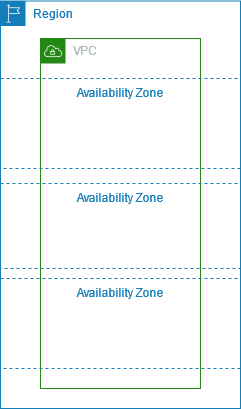
Fig 2.1: A typical AWS VPC setup showing subnets across Availability Zones, routing, and a VPN connection to a corporate network.
- When you create a VPC or VNet, you must specify a range of IPv4 addresses in the form of a Classless Inter-Domain Routing (CIDR) block (e.g.,
10.0.0.0/16). This is the primary CIDR block for your virtual network. - A VPC/VNet spans all the Availability Zones in the region. After creation, you can add one or more subnets in each Availability Zone. Each subnet's CIDR block must be a subset of the VPC/VNet CIDR block and must reside entirely within a single Availability Zone.
- Availability Zones are distinct, physically isolated locations within a region, engineered to be independent from failures in other AZs. By launching instances in separate Availability Zones, you can protect your applications from the failure of a single location.
- You can also optionally assign an IPv6 CIDR block to your VPC/VNet and assign IPv6 CIDR blocks to your subnets.
Subnet Types
Subnets are logical subdivisions of your VPC/VNet's IP address range, allowing you to segment your network and control traffic flow.
- Public Subnet: If a subnet's traffic is routed to an Internet Gateway, it is known as a public subnet. Instances in a public subnet can communicate with the internet. For IPv4 internet communication, instances must have a public IPv4 address or an Elastic IP address (AWS). For IPv6, they need an IPv6 address.
- Private Subnet: If a subnet does not have a route to the Internet Gateway, it is known as a private subnet. Instances in private subnets are isolated from direct internet access, typically relying on NAT Gateways for outbound internet access or private links for accessing cloud services.
- VPN-Only Subnet: A private subnet whose traffic is routed to a Virtual Private Gateway for a Site-to-Site VPN connection. This enables secure and private communication with on-premises networks.
Network Security Controls
Cloud providers offer multiple layers of network security to protect your resources, operating at different levels of the network stack.

Fig 2.2: Illustrates network security layers in AWS, showing how traffic flows through Network ACLs at the subnet level and Security Groups at the instance level.
| Feature | Security Group (AWS) / Network Security Group (Azure) | Network Access Control List (NACL) (AWS) / Azure Security Group (for subnets) |
|---|---|---|
| Operates at | Instance level (VM, Container, etc.) | Subnet level |
| Rules | Supports allow rules only | Supports allow rules and deny rules |
| Statefulness | Stateful: Return traffic is automatically allowed, regardless of any rules. | Stateless: Return traffic must be explicitly allowed by rules. |
| Rule Processing | All rules are evaluated before deciding whether to allow traffic. | Rules are processed in number order (lowest to highest) when deciding whether to allow traffic. |
| Application | Applies to an instance only if explicitly associated during launch or later. | Automatically applies to all instances within the subnets it's associated with, providing an additional layer of defense. |
Flow Logs:
Capture information about the IP traffic going to and from network interfaces in your VPC/VNet. This data is invaluable for diagnosing overly restrictive or permissive security rules and for security monitoring and compliance auditing.
Connectivity Options
Connecting your cloud resources to each other and to your on-premises environment is crucial for hybrid and multi-cloud architectures.
- VNet Peering (Azure): Connects two Azure VNets seamlessly, allowing resources in one VNet to communicate with resources in the other as if they were in the same network. This is a low-latency, high-bandwidth connection within the Microsoft backbone.
- Site-to-Site VPN (STS VPN): Connects your on-premises network to your cloud VNet over an encrypted tunnel across the public internet. This is a cost-effective way to extend your corporate network into the cloud.
- Point-to-Site VPN (PTS VPN): Allows individual client computers (e.g., developers, administrators) to connect securely to your cloud VNet over an encrypted tunnel, typically over the public internet.
- ExpressRoute (Azure) / Direct Connect (AWS): A private, dedicated, high-bandwidth connection from your on-premises network directly to your cloud provider's network, bypassing the public internet. This offers enhanced security, reliability, lower latency, and higher speeds compared to VPNs over the internet.

Fig 2.3: An ExpressRoute circuit connecting a customer's network to Microsoft's edge, enabling private access to Azure services and Microsoft 365.
Load Balancing and Traffic Management
These services distribute incoming network traffic across multiple servers or resources to ensure high availability, scalability, and optimal performance.
| Service | Azure Load Balancer | Azure Application Gateway | Azure Traffic Manager |
|---|---|---|---|
| Technology Layer | Transport level (Layer 4) | Application level (Layer 7) | DNS level |
| Application Protocols Supported | Any (TCP, UDP) | HTTP and HTTPS | Any (HTTP/HTTPS endpoint required for monitoring) |
| Endpoints | Azure VMs, Cloud Services role instances | Any Azure Internal IP address or public internet IP address | Azure VMs, Cloud Services, Azure Web Apps, external endpoints |
| VNet Support | Both Internet-facing and internal (VNet) applications | Both Internet-facing and internal (VNet) applications | Only supports Internet-facing applications |
| Endpoint Monitoring | Supported via probes | Supported via probes | Supported via HTTP/HTTPS GET |
Azure Load Balancer delivers high availability and network performance to your applications. It is a Layer 4 (TCP, UDP) load balancer that distributes incoming traffic among healthy instances of services defined in a load-balanced set. It can be configured for public (Internet-facing) or internal load balancing.
Azure Application Gateway provides an Application Delivery Controller (ADC) as a service, offering various Layer 7 load balancing capabilities for your application. This includes features like TLS (SSL) offload (unburdening web servers from encryption overhead), cookie-based session affinity, URL path-based routing (directing traffic based on URL paths), and the ability to host multiple websites behind a single gateway. It also includes Web Application Firewall (WAF) for protection against common web vulnerabilities.

Fig 2.4: Azure Application Gateway routing traffic to different backend pools based on URL paths, managed by Traffic Manager for multi-region deployments.
Azure Traffic Manager allows you to control the distribution of user traffic for service endpoints in different data centers or regions. It uses the Domain Name System (DNS) to direct client requests to the most appropriate endpoint based on a traffic-routing method (e.g., Priority, Weighted, Geographic, Performance) and the health of the endpoints. Traffic Manager is resilient to failure, including the failure of an entire Azure region, ensuring global high availability.

Fig 2.5: Azure Web Application Firewall (WAF) at the edge, protecting web applications from common attacks and protocol violations.
Azure Front Door is a global, scalable entry-point that uses Microsoft's global edge network to create fast, secure, and widely scalable web applications. It combines capabilities like Web Application Firewall (WAF), Content Delivery Network (CDN), and global load balancing, providing optimized routing and security for global web traffic.
High Availability (HA) & Disaster Recovery (DR)
High Availability ensures a system remains operational and accessible for a high percentage of time, minimizing downtime during component failures. Disaster Recovery focuses on recovering from catastrophic failures with minimal data loss and downtime, ensuring business continuity.
Redundancy Planning
Redundancy ensures that if one component fails, another can take its place, preventing service interruption and maintaining operational continuity.
- N+1 Redundancy: Adds one additional node (or component) beyond the minimum 'N' required for operation. Often used in Active-Passive configurations where the extra node serves as a standby, ready to take over.
- N+M Redundancy: Adds 'M' additional nodes for 'N' primary nodes, providing more capacity for failover or load distribution. This offers higher resilience than N+1.
- N to 1 Redundancy: Similar to N+1, but the failover mechanism ensures that the workload fails back to the primary node once it is available. This can be useful for maintaining consistent resource allocation or specific licensing models.
- N to N Redundancy (Active-Active): All 'N' instances are active and running, sharing the load. This provides inherent high availability and scalability without the need for a dedicated standby, as any instance can take over the load of a failed one. This is the most resilient and performant option.
High Availability Planning Strategies
These strategies define the state of secondary systems and their recovery times in a failover scenario.
- Cold Standby: A secondary instance is off and only brought online when the primary fails. This is the most cost-effective but has the longest recovery time (typically hours) due to startup and data synchronization.
- Warm Standby: A secondary node is on but may not have the latest production data or be fully scaled. It's partially ready, requiring some time (minutes) to catch up and scale to full capacity after a failover.
- Hot Standby: Both primary and secondary systems are on. The secondary is up-to-date with data but not actively processing requests. It can take over almost immediately (seconds) upon primary failure, offering very low recovery time.
- Active-Active: Both primary and secondary systems are running and actively processing requests, distributing the load. This offers the highest availability and immediate failover as both sites are fully operational.
Key HA Concepts & Azure Services
Azure provides foundational services to build highly available applications within its regions.
-
Availability Sets: A logical grouping capability for isolating VM workloads from unplanned downtime. VMs within an Availability Set are distributed across different fault domains and update domains to minimize the impact of hardware failures or planned maintenance.
- Fault Domain (FD): A logical group of underlying hardware that shares a common power source and network switch. Azure distributes VMs across a maximum of 3 fault domains within an Availability Set to protect against single points of hardware failure.
- Update Domain (UD): A logical group of VMs that can be rebooted at the same time during planned maintenance or updates. Azure distributes VMs across a maximum of 20 update domains (typically 5 for standard VMs) to ensure that not all instances of an application are updated simultaneously.
- Availability Zones (AZs): Physically separate locations within an Azure region, each with independent power, cooling, and networking. Deploying resources across AZs protects applications and data from datacenter-level failures, offering a higher level of availability than Availability Sets alone.
- Infrastructure High Availability: Designing the underlying infrastructure to support HA solutions involves strategically deploying resources across Availability Zones and Availability Sets, and implementing robust CI/CD pipelines to ensure consistent and reliable deployments that minimize human error.
Disaster Recovery Planning
Defining acceptable levels of data loss and downtime is crucial for establishing effective disaster recovery strategies.
- Recovery Time Objective (RTO): The maximum acceptable duration of time that an application can be down after a disaster without causing significant damage to the business. It answers the question: "How long can it take for our system to recover after we were notified of a business disruption?"
- Recovery Point Objective (RPO): The maximum acceptable amount of data (measured in time) that can be lost from the point of failure to the point of recovery. It indicates how fresh the recovered data will be and answers: "How much data can we afford to lose?" RPO is directly related to the frequency of data backups or replication.
Disaster Recovery Strategies in AWS
AWS offers various strategies to achieve different RTO and RPO targets, ranging from simple backup to multi-site active-active deployments.
- Backup and Restore: The simplest and most cost-effective DR strategy. Data is regularly backed up (e.g., to S3) and restored to a new environment in case of a disaster. This typically has a higher RTO and RPO.
- Pilot Light: Replicates core IT infrastructure and data to a recovery region. A scaled-down version of your environment (the "pilot light") is kept running in the DR region. In a disaster, this minimal environment can be quickly scaled up to full production capacity. This offers lower RTO/RPO than backup and restore.
- Warm Standby: A scaled-down, but fully functional, environment is always running in the cloud. This environment is kept up-to-date with production data. In a disaster, it can take over production traffic with minimal data loss and a relatively low recovery time.
- Multi-site Solution (Hot Standby / Active-Active): The most robust DR strategy, where a fully operational environment is running in multiple regions simultaneously. This provides the lowest RTO and RPO, often with near-zero downtime, as traffic can be immediately shifted to the healthy region.
- 3rd Party Disaster Recovery as a Service (DRaaS): Utilizing specialized third-party services (e.g., AWS CloudEndure Disaster Recovery - CEDR) to manage and orchestrate the replication and recovery process, often providing continuous replication and automated failover.
Disaster Recovery in Azure
Azure provides a comprehensive suite of services to implement robust disaster recovery plans, enabling organizations to protect their workloads across regions and on-premises.

Fig 3.1: An Azure Site Recovery setup showing high availability within Region 1 and disaster recovery to Region 2 via Traffic Manager and replicated disks.
- Azure Site Recovery Service: Orchestrates and automates replication, failover, and recovery of virtual machines (Azure VMs, Hyper-V, VMware) and physical servers to Azure or a secondary datacenter. It provides a unified management experience for DR.
- Azure Blob Service: Provides highly durable, scalable, and available storage, making it ideal for storing backups, replicated data, and recovery points for DR strategies.
- Azure Traffic Manager: Used for global load balancing and intelligent routing of user traffic across primary and failover sites/regions. It can automatically redirect users to the healthy DR site in case of a primary region outage.
- SQL Always On Availability Groups: For high availability and disaster recovery for SQL Server databases, allowing automatic failover and readable secondaries across different Azure regions or on-premises.
- VPN Gateway: For secure connectivity between on-premises networks and Azure Virtual Networks, essential for hybrid DR scenarios where on-premises resources need to communicate with Azure recovery sites.

Fig 3.2: Azure Site Recovery orchestrating failover of on-premises workloads (Linux, Windows VMs, SQL) to an Azure failover site, utilizing VPN tunnels and Active Directory replication.
Cloud Security
Cloud security is a shared responsibility between the cloud provider and the customer. It encompasses protecting data, applications, and infrastructure from threats and vulnerabilities, ensuring compliance and maintaining trust.
Core Security Principles (CIA Triad)
The fundamental pillars of information security:
- Confidentiality: Protecting information from unauthorized access. This involves encryption, access controls, and data masking.
- Integrity: Ensuring data is accurate, complete, and has not been tampered with. This includes data validation, hashing, digital signatures, and version control.
- Availability: Ensuring systems and data are accessible to authorized users when needed. This involves redundancy, disaster recovery, load balancing, and effective monitoring.
Security Lifecycle
A structured approach to integrating security throughout the software development and operations process.
- Planning: Identify and document categories of threats. Define the approach and scope for mitigation. Conduct a threat modeling exercise to illustrate potential threats to each component.
- Design: Design security policies and standards. Refine threat identification based on architectural design decisions. Incorporate security requirements into the design phase.
- Build: Implement threat mitigations during development. Integrate security controls directly into the code and infrastructure as code templates.
- Testing: Perform various security tests, including penetration testing, vulnerability scans, static/dynamic application security testing (SAST/DAST), and code reviews.
- Remediation: Address identified vulnerabilities and security flaws. Implement patches, configuration changes, and code fixes. Ensure a feedback loop to prevent recurrence.
Reducing Attack Surface Area
Minimizing the points where an unauthorized user can try to enter or extract data from an environment.
- Remove all unnecessary users and groups from operating systems.
- Identify and regularly review group memberships for all users.
- Implement strong group policies using directory services (e.g., Azure Active Directory, AWS IAM).
- Block script execution unless it is signed by trusted authorities.
- Log and audit all activities for suspicious behavior detection and forensic analysis.
- Install and regularly update antimalware and antivirus software; schedule frequent scans.
- Disable or shut down services that are not required.
- Lock down the filesystem and registry for only authorized access.
- Configure firewalls strictly according to solution needs (least privilege principle).
- Set PowerShell script execution policy to "Restricted" or "RemoteSigned".
- Enable enhanced protection features in browsers (e.g., Internet Explorer's Enhanced Security Configuration).
- Restrict the ability to create new users and groups.
- Remove direct internet access to servers; implement jump servers or bastion hosts for RDP/SSH access.
- Use Site-to-Site VPN or Point-to-Site VPN or ExpressRoute/Direct Connect to RDP into remote machines from within your trusted network.
- Regularly deploy all security updates and patches.
- Run security compliance manager tools on the environment and implement all its recommendations.
- Actively monitor the environment using security information and event management (SIEM) tools (e.g., Azure Security Center, Operations Management Suite, AWS Security Hub).
- Deploy network virtual appliances (NVAs) to route traffic through internal proxies and reverse proxies for inspection and control.
- Encrypt all sensitive data such as configuration, connection strings, credentials, and so on, both at rest and in transit.
Azure Cloud Security Features (from Azure Cloud Security.docx)
Azure provides built-in capabilities across various functional areas to help manage security responsibilities.
Operations:
- Security and Audit Dashboard: Provides a comprehensive view into your organization's IT security posture with built-in search queries for notable issues and the ability to configure automated actions.
- Azure Resource Manager: Enables you to work with resources as a group, deploying solutions via templates that integrate standard security control settings, reducing configuration errors.
- Application Insights: An extensible Application Performance Management (APM) service that monitors live web applications, automatically detects performance anomalies, and helps diagnose issues, contributing to application availability.
- Azure Monitor: Offers visualization, query, routing, alerting, auto-scale, and automation on data from Azure infrastructure (Activity Log) and individual resources (Diagnostic Logs), allowing alerts on security-related events.
- Azure Monitor Logs: Provides an IT management solution for on-premises, third-party cloud, and Azure resources. It's a useful tool in forensic and other security analysis due to its flexible query approach across large amounts of security-related entries.
- Azure Advisor: A personalized cloud consultant that analyzes resource configuration and usage telemetry, recommending solutions to improve performance, security, and high availability, and reduce costs.
- Azure Security Center (Microsoft Defender for Cloud): Helps prevent, detect, and respond to threats with increased visibility into and control over the security of your Azure resources. It provides integrated security monitoring and policy management across subscriptions.
Applications:
- Web Application Vulnerability Scanning: Integration with third-party tools (e.g., Tinfoil Security) for one-click vulnerability scanning on App Service apps.
- Penetration Testing: Organizations must follow the Azure penetration testing approval process and obtain prior approval to perform their own penetration tests.
- Web Application Firewall (WAF): A feature of Azure Application Gateway that protects web applications from common web-based attacks like SQL injection, cross-site scripting, and session hijacking, preconfigured with OWASP Top 10 protections.
- Authentication and Authorization in Azure App Service: A built-in feature that provides a way for your application to sign in users, protecting the application without requiring backend code changes.
- Layered Security Architecture: App Service Environments provide an isolated runtime environment within an Azure Virtual Network, enabling developers to create layered security architectures with Network Security Groups (NSGs) to restrict public access to API back-ends.
- Web Server Diagnostics and Application Diagnostics: Provide logging functionality for web server (Detailed Error Logging, Failed Request Tracing, Web Server Logging) and application (System.Diagnostics.Trace) information to aid in troubleshooting and security analysis.
Storage:
- Azure Role-Based Access Control (Azure RBAC): Secure your storage account by restricting access based on the need-to-know and least privilege security principles, assigning appropriate Azure roles to groups and applications.
- Shared Access Signature (SAS): Provides delegated access to resources in your storage account, granting a client limited permissions (specified period, specific actions) to objects without sharing your account access keys.
- Encryption in Transit: Protects data when it is transmitted across networks using transport-level encryption (HTTPS), wire encryption (SMB 3.0 for Azure Files), and client-side encryption (encrypting data before transfer).
- Encryption at Rest: Provides encryption for data stored in Azure. Features include Storage Service Encryption (automatic encryption by the service), Client-side Encryption (data encrypted before upload), and Azure Disk Encryption (for OS and data disks of IaaS VMs).
- Storage Analytics: Performs logging and provides metrics data for a storage account, used to trace requests, analyze usage trends, and diagnose issues. Logs include successful and failed requests, SAS requests, and analytics data requests.
- Enabling Browser-Based Clients Using CORS: Cross-Origin Resource Sharing (CORS) is a mechanism that allows domains to give each other permission for accessing resources. Azure storage services support CORS, allowing properly authenticated requests from different domains based on defined rules.
Networking:
- Network Layer Controls: Limiting connectivity to and from specific devices or subnets, forming the core of network security.
- Network Security Groups (NSGs): Basic stateful packet filtering firewall controlling access based on a 5-tuple (source IP, source port, destination IP, destination port, protocol). They control traffic between subnets and to/from the Internet.
- Route Control and Forced Tunneling: User-Defined Routes (UDRs) allow customizing inbound and outbound paths for traffic. Forced tunneling ensures all outbound Internet traffic from an Azure VNet is routed through on-premises security proxies and firewalls.
- Virtual Network Security Appliances: Partner network security solutions available in the Azure Marketplace that provide enhanced security features at higher levels of the OSI model (e.g., application layer inspection).
- Azure Virtual Network (VNet): A representation of your own network in the cloud, providing logical isolation of the Azure network fabric. You have full control over IP address blocks, DNS settings, security policies, and route tables.
- VPN Gateway: A type of virtual network gateway that sends encrypted traffic across a public connection (Site-to-Site, Point-to-Site) or between Azure Virtual Networks over the Azure network fabric.
- ExpressRoute: A dedicated WAN link that extends your on-premises networks into the Microsoft cloud over a private connection, offering higher security, reliability, faster speeds, and lower latencies than VPNs over the Internet.
- Application Gateway: Provides Layer 7 load balancing and Application Delivery Controller (ADC) features, including Web Application Firewall (WAF) to protect web applications from common attacks.
- Traffic Manager: Controls the distribution of user traffic for service endpoints across different data centers, using DNS to direct client requests based on routing methods and endpoint health.
- Azure Load Balancer: A Layer 4 (TCP, UDP) load balancer that distributes incoming traffic among healthy instances of services, configurable for public or internal load balancing.
- Internal DNS / Azure DNS: DNS services that translate domain names to IP addresses. Internal DNS allows managing DNS servers within a VNet, while Azure DNS is a hosting service for DNS domains using Microsoft Azure infrastructure. Both support availability.
- Azure Monitor Logs NSGs: Diagnostic log categories for NSGs (Event, Rules counter) provide insights into applied rules and traffic counts.
Compute:
- Antimalware & Antivirus: Use antimalware software from security vendors (e.g., Microsoft Antimalware) to protect virtual machines from malicious files and threats.
- Hardware Security Module (HSM): Azure Key Vault provides the option to store cryptographic keys in FIPS 140-2 Level 2 certified HSMs, simplifying key management and security.
- Virtual Machine Backup: Azure Backup protects application data for Windows and Linux IaaS virtual machines, guarding against data corruption and human errors.
- Azure Site Recovery: Helps orchestrate replication, failover, and recovery of workloads and apps to a secondary location, crucial for business continuity/disaster recovery.
- SQL VM TDE: Transparent Data Encryption (TDE) for SQL Server on Azure VMs, integrated with Azure Key Vault for secure management of encryption keys.
- VM Disk Encryption: Azure Disk Encryption encrypts Windows and Linux IaaS virtual machine disks (OS and data) using BitLocker/DM-Crypt, with keys managed in Azure Key Vault.
- Virtual Networking: Azure requires virtual machines to be connected to an Azure Virtual Network, which provides logical isolation and ensures network traffic is not accessible to other customers.
- Patch Updates: Provide the basis for finding and fixing potential problems and simplify software update management by reducing deployment complexity and improving compliance monitoring.
- Security Policy Management and Reporting: Azure Security Center provides integrated security monitoring and policy management across Azure subscriptions, helping prevent, detect, and respond to threats.
Identity and Access Management:
- Secure Identity: Microsoft employs Multi-Factor Authentication (MFA), Microsoft Authenticator, strong password policy enforcement, and token-based authentication via Azure Active Directory.
- Azure Role-Based Access Control (Azure RBAC): Enables you to grant access based on the user's assigned role, making it easy to give users only the amount of access they need to perform their job duties (least privilege).
- Integrated Identity Management (Hybrid Identity): Enables maintaining control of user access across internal datacenters and cloud platforms, creating a single user identity for authentication and authorization to all resources (e.g., Azure AD Connect).
- Cloud App Discovery: A premium feature of Azure Active Directory that enables you to identify cloud applications used by employees in your organization.
- Azure Active Directory Identity Protection: A security service that uses Azure Active Directory anomaly detection capabilities to provide a consolidated view into risk detections and potential vulnerabilities affecting identities.
- Azure Active Directory Domain Services: Enables you to join Azure VMs to a domain without deploying domain controllers, allowing users to sign in with corporate Active Directory credentials.
- Azure Active Directory B2C: A highly available, global identity management service for consumer-facing applications, scaling to hundreds of millions of identities and integrating across mobile and web platforms.
- Azure Active Directory B2B Collaboration: A secure partner integration solution that supports cross-company relationships by enabling partners to access corporate applications and data using their self-managed identities.
- Azure Active Directory Join: Extends cloud capabilities to Windows 10 devices for centralized management, simplifying access to apps and resources.
- Azure Active Directory Application Proxy: Provides Single Sign-On (SSO) and secure remote access for web applications hosted on-premises.
Securing Cloud Best Practices (General)
- Treat identity as the primary security perimeter: Centralize identity management, enable Single Sign-On (SSO), deploy password management, and enforce Multi-Factor Authentication (MFA) for all users.
- Use Role-Based Access Control (RBAC): Segregate duties within your team and grant only the amount of access to users that they need to perform their jobs (least privilege).
- Control resource creation locations: Use Resource Manager, Azure Policy, and Azure Blueprints to define and enforce where resources can be created within your cloud environment.
- Monitor for suspicious activities: Implement active monitoring systems to identify attempts to sign in without being traced, brute force attacks, sign-ins from multiple locations, infected devices, and suspicious IP addresses.
- Lower exposure of privileged accounts: Manage, control, and monitor access to highly privileged accounts. Implement "just in time" (JIT) access, define emergency access accounts, and use dedicated admin workstations.
- Protect Keys: Store and manage cryptographic keys and secrets securely using services like Azure Key Vault (AKV).
- Rotate Credentials: Regularly rotate all credentials (e.g., service account passwords, API keys, certificates) to minimize the window of exposure if they are compromised.
- Ensure proper length and algorithm: Use strong, industry-standard hashing algorithms (e.g., SHA2-256, SHA3) and ensure passwords and keys meet complexity and length requirements.
PaaS Security Specifics
- Authenticate through Azure Active Directory (AD).
- Restrict access based on the need-to-know and least privilege security principles.
- Protect your keys using services like Azure Key Vault (AKV).
- Restrict incoming source IP addresses, often by integrating with Virtual Networks (VNet).
- Use Azure Active Directory Authentication over SQL Authentication for managed databases.
- Use Azure Service Endpoints and Private Link to connect to services securely, avoiding public internet exposure.
IaaS Security Specifics
- Use Privileged Access Workstations (PAWs) for administrative tasks to isolate sensitive operations from general browsing and email.
- Enforce Multi-Factor Authentication (MFA) for all administrative access.
- Limit and constrain administrative access to virtual machines and infrastructure components.
- Use DevTest Labs to provide isolated and controlled environments for development and testing, reducing security risks to production.
- Control and limit endpoint access to VMs, exposing only necessary ports and protocols.
- Use a key management solution (like Azure Key Vault) to securely store and manage encryption keys.
- Encrypt virtual disks and disk storage to protect data at rest.
- Use a centralized security management system (e.g., Azure Security Center) for unified visibility and control.
- Manage operating systems by regularly applying security patches and hardening configurations.
- Install and manage antimalware software on all virtual machines.
- Continuously monitor IaaS resources for security threats and compliance deviations.
Azure Network Security Features
Azure provides advanced networking capabilities to secure traffic within your virtual networks and to external services.
-
Virtual Network Service Endpoints: Allow you to extend your virtual network private address space to Azure services (e.g., Storage Account, SQL Database) over a direct connection. This restricts access to the service from only specific virtual networks or subnets. While you still connect to a public endpoint, the traffic path is optimized and secured within the Microsoft backbone.
- Access is not transitive: If you allow access from your VNet, this does not automatically allow access from resources connected to that VNet via VPN or ExpressRoute unless explicitly configured.
- VNets should be in the same region as the resource.
- Only one service endpoint for each service can be configured on each subnet.
-
Azure Private Link: A newer functionality for selected PaaS services that allows you to create a private endpoint in your virtual network. Your private endpoint provides an internal IP address for your PaaS service, and all traffic from your virtual network to the PaaS resource goes over the Microsoft backbone and not over the internet.
- Provides a private IP to reference your PaaS resources.
- Traffic to PaaS resources traverses the Microsoft network, enhancing security and performance.
- Supports access from both peered virtual networks and on-premises resources connected via ExpressRoute or VPN.
- Users' access is now restricted solely to the specific resource (database, storage account, etc.), not the whole service, allowing complete control of data egress.
- Private endpoints can be created to resources in different regions and even different tenants.
-
Service Endpoint vs. Private Link Comparison:
Feature Service Endpoint Private Link Traffic Path Exposed over the Internet (but locked down to VNet) Travels over Microsoft's backbone (private) DNS Resolution Supports resolution of PaaS resources using the same public name Requires private DNS zones for resolution of PaaS resources using private IPs Hybrid Connectivity Does Not allow access from your on-premises infrastructure to Azure resources over an ExpressRoute circuit, or Site to Site VPN tunnel, or via its peered VNets. Allows access from your on-premises infrastructure to Azure resources over an ExpressRoute circuit, or Site to Site VPN tunnel, or via its peered VNets. IP Type Public IP Private IP Egress Control Cannot control egress of specific PaaS resource (only the service) Once enabled, granted access to a specific PaaS resource within your VNet. Meaning, you can control the egress to the PaaS resource. Simplicity Much simpler to implement and significantly reduce the complexity of your VNet/Architecture design More complex, but provides greater isolation and granular control. Cost $0 cost to implement Service Endpoints Consider additional monthly costs (e.g., ~$2000 monthly for certain scenarios) Availability Generally Available (GA) Generally Available (GA) Dependencies Application Gateway might still be needed for Layer 7 features Application Gateway is not needed for private access; no longer required to set up access restrictions via NSG rules for outbound traffic to PaaS.
Application-Specific Security
Securing Service Bus:
- Applications gain access to Azure Service Bus resources using Shared Access Signature (SAS) token authentication.
- Azure Active Directory (Azure AD) integration for Service Bus resources provides Role-Based Access Control (RBAC) for fine-grained control over a client's access. Permissions are granted to security principals (user, group, or application service principal) authenticated by Azure AD to return an OAuth 2.0 token.
Securing Storage Account:
- Azure Active Directory (Azure AD): Azure AD integration is available for Blob and Queue services, allowing fine-grained access to users, groups, or applications via role-based access control (RBAC).
- Shared Key: Authorization relies on your account access keys and other parameters to produce an encrypted signature string passed in the Authorization header.
- Shared Access Signatures (SAS): Delegate access to a particular resource in your account with specified permissions and over a specified time interval (Account level, Service level, or User level SAS).
- Anonymous Access: You can optionally make blob resources public at the container or blob level, allowing anonymous read access without requiring authorization.
- Consider also using Stored Access Policies to manage SAS tokens.
Securing Web Application:
- Implement OAuth2.0/OpenId Connect for user authentication and authorization.
- Implement appropriate exception handling to gracefully recover and inform stakeholders about issues.
- Implement retry mechanisms to perform the same operation again in fixed intervals for a certain number of times before exiting in the event of a transient error.
- Have inbuilt timeout capability to decide that an exception cannot be recovered from, preventing indefinite waiting.
- Maintain comprehensive logs for all errors, exceptions, and execution flows within the application.
- Profile applications to find their actual resource requirements (compute, memory, network bandwidth) for different user loads.
- If possible, store data on Azure provided services such as Azure SQL, Cosmos DB, and Table Storage for built-in security and scalability features.
- Use storage accounts that are based on geo-redundant storage (GRS/RA-GRS) and ensure that data is replicated to multiple regions, not only within a zone or data center.
- Take periodic backups and conduct restore tests frequently to validate data recoverability.
- If storing data in virtual machines, ensure that there are multiple virtual machines and they are either on availability sets or availability zones for high availability.
- Use keys and secrets to data stores in Azure Key Vault for secure storage and management.
- Use OMS (Log Analytics) for monitoring the environment and enable log auditing for security insights.
- Use Application Insights to capture telemetry information from custom application code related to compute, storage, network, and other log information.
- Ensure alerts are configured on OMS for issues related to availability of the environment and application.
- Visit Azure Monitor frequently to gather recommendations related to high availability and performance.
- For Single Page Applications (SPAs), consider the Implicit Grant Flow of OAuth (though newer flows like Authorization Code Flow with PKCE are preferred for public clients).
- Using Microsoft Authentication Library (MSAL) and Microsoft Graph: Send Client Id to get Identity or user Token, then send the token and get the access token, then validate the token on the server and use it after that.
- Use Windows authentication if it is an internal application.
- Implement RFC 7636: Proof Key for Code Exchange (PKCE) for enhanced security in OAuth public clients (like SPAs and mobile apps).
- Utilize Backends for Frontends (BFF) pattern to tailor APIs for specific client needs and enhance security.
Securing Microservices:
- Use Managed Identities for Azure resources to authenticate to services without managing credentials.
- Implement Node-to-node security either by an X.509 certificate on all the nodes or using Windows security (e.g., Group Managed Service Accounts - gMSA).
- Implement Client-to-node security using certificate security or Windows security. Specify an admin client certificate or a user client certificate. As a best practice, these should be different from node-to-node certificates. The client runs under a user (service account) that has access to the cluster by RBAC/AAD and/or a client certificate.
- Use Role-based security (RBAC): With Azure AD, define roles like Admin-Client and Readonly-Client to control access.
- Encrypt and configuration values: A data encipherment certificate is used strictly for encryption and decryption of configuration values in a service's Settings.xml. Alternatively, store sensitive configuration values in Azure Key Vault (AKV).
- Use an Ingress Controller: A piece of software that provides reverse proxy, configurable traffic routing, and TLS termination for Kubernetes services.
- Perform regular scans for vulnerabilities.
- Ensure encryption of data across nodes during replication.
- Configure Windows security using the ClusterConfig.JSON file (e.g., using gMSA identity).
-
Utilize APIM (API Management) with one of these four options for secure API exposure:
- Option 1: Expose Service publicly and make it responsible for authentication; APIM will provide the security token.
- Option 2: Install Ingress Controller and configure mTLS (Mutual TLS Authentication) for client-to-service authentication.
- Option 3: Deploy APIM inside the cluster VNet in external mode, allowing external clients to consume the service while hiding the entry point in the private network.
- Option 4: Deploy APIM inside the cluster VNet in internal mode, when all the clients are within the VNET, ensuring private network access only.
- VNet Injection: Inject the service inside the Subnet and remove the public internet facing endpoint (e.g., for SQL, APIM, Load Balancer).
- Service Endpoint: Create a service endpoint on the subnet you want to allow access to and configure the allowed services (e.g., in Firewall and Virtual Network Tab). Update NSG rules with Service Tags instead of specific IP addresses for easier management.
- Private Link or Private End Point: Provides a private IPv4 and TCP endpoint, supports cross-tenants, is transitive, not impacted by NSG rules, and removes the public internet facing endpoint from a service. This offers more granular access control to specific instances of a service.
Securing Mobile Apps:
- Implement security measures at the application layer, allowing the phone to control security/access.
- Don�t limit tools to anti-malware; use data analyzers that provide insights into encryption and data handling.
- Only download apps from trusted sources (e.g., official app stores).
- Ensure the app does not save passwords or sensitive credentials locally.
- Encrypt data in transit over Wi-Fi, cellular networks, and other communication channels.
- "Listen" to the traffic that flows between the mobile app and the Web server for anomalies.
- Contain critical corporate data using container techniques like sandboxing or secure folders.
- Update your Mobile OS with security patches regularly.
- Regularly back up your mobile device.
- Utilize encryption for data at rest (device encryption, secure folders) and in transit (Wi-Fi, VPNs).
- Enable Remote Data Wipe as an option in case the device is lost or stolen.
- Disable Wi-Fi and Bluetooth when not needed to reduce attack vectors.
- Don't fall for phishing schemes.
- Avoid all jailbreaks or rooting, as they compromise device security.
- Add a Mobile Security App.
- Communicate your Mobile Security Best Practices to users.
Securing IoT Solutions:
- Follow secure software development methodology throughout the IoT solution lifecycle.
- Choose open-source software with care, reviewing its security posture.
- Integrate components with care, ensuring secure communication and data flow.
- Deploy hardware securely, protecting physical access to devices.
- Keep authentication keys safe and manage them securely.
- Keep systems up to date with the latest firmware and software patches.
- Protect against malicious activity: if the operating system permits, place the latest anti-virus and anti-malware capabilities on each device operating system.
- Audit frequently for security events and compliance.
- Physically protect the IoT infrastructure (devices, gateways, servers).
- Protect cloud credentials used by IoT devices and services.
- Seven properties of highly secure devices: Hardware root of trust, Defense in depth, Small trusted computing base, Dynamic, Certificate-based authorization, Failure reports, Renewable security.

Fig 4.1: Table outlining seven properties of highly secure IoT devices with examples and questions to prove each property.
- Azure Sphere MCU (Microcontroller Unit) and Azure Security Center are key services for securing IoT deployments.
Securing Azure Functions:
- You can whitelist the IP address to the function or the proxy (via Azure Portal, ARM Template).
- CORS (Cross-Origin Resource Sharing) is something you need to configure for browser-based access.
- Provide security tokens for full authentication and authorization check or validation.
- You can build functions inside a V-NET using the Azure App Service Environment (ASE). This provides network isolation but requires the Premium service plan version of Azure Functions. The allowed list can include individual IP addresses or a range of IP addresses defined by a subnet mask.
- Disallow anonymous access and do not expose the access code, which would be achieved by hiding the trigger from the user.
- Use APIM (API Management) for validating input (Headers, error messages, principal privilege) and preventing misconfiguration.
- Alternatively, you can store some configuration values in AKV (Azure Key Vault) for enhanced security.
- There are multiple certifications used for encryption and decryption of application configuration values, encryption of data across nodes during replication, and additional client certificates when manual authentication is required.
Data Security Best Practices (At Rest & In Transit)
- Enforce Multi-Factor Authentication (MFA) for all access to sensitive data and systems.
- Use Role-Based Access Control (RBAC) to grant the least privilege necessary for users and services.
- Encrypt Azure virtual machines (OS and data disks) using solutions like BitLocker & DM-Crypt, integrated with Azure Key Vault (AKV) for key management.
- Use Hardware Security Modules (HSMs) via AKV to protect cryptographic keys.
- Manage sensitive operations from Secure Workstations to minimize exposure to threats.
- Protect data in transit using Transport Layer Security (TLS), Virtual Private Networks (VPNs), and HTTPS.
- Enforce file-level data encryption where granular control is needed.
- Install the RMS sharing app, which integrates with Office applications to allow users to easily protect files directly using Azure Rights Management Service (RMS).
- Configure applications and services to support Azure RMS and create custom templates that reflect your business requirements (e.g., for "top secret" data).
SQL Server Specific Security
- Discover, classify, and label the sensitive data in your databases.
- Track database vulnerabilities to proactively improve your database security.
- Enable threat detection (e.g., Azure SQL Database Threat Detection).
- Use firewall rules to restrict database access.
-
Enable database authentication:
- Enable SQL Server authentication at the database level.
- Use Azure AD authentication by using RBAC roles.
- Make sure that users and applications use separate accounts to authenticate to limit permissions and reduce risk.
- Implement database-level security by using fixed database roles (such as
db_datareaderordb_datawriter) or create custom roles. -
For other ways to secure your data, consider:
- Cell-level encryption: To encrypt specific columns or even cells of data with different encryption keys.
- Always Encrypted: Allows clients to encrypt sensitive data inside client applications and never reveal the encryption keys to the Database Engine (SQL Database or SQL Server). This provides a separation between those who own the data (and can view it) and those who manage the data (but should have no access).
- Row-Level Security (RLS): Enables customers to control access to rows in a database table based on the characteristics of the user who is executing a query (e.g., group membership, execution context).
- Enable database auditing.
- Encrypt at transit: On the flight using Https/TLS.
- Encrypt the hard disk (at rest): Transparent Data Encryption (TDE) at rest.
- Column Level Encryption: Often achieved using Always Encrypted.
- Cell level encryption CLE: Manual operation, where the key can be symmetric or asymmetric and stored in the database.
- Row-level encryption: Each row has a unique password for all of its cells, where conditions are met (like rules or locations).
- Tablespace-level encryption: Each tablespace has a unique password for all of its contents.
- File-level encryption: Individual files are encrypted in blocks according to predetermined criteria.
- Dynamic Data Masking (DDM): Obscuring or obfuscating data in some columns in query results without changing the data in the database.
- Client encryption, or application encryption.
- Using Key Vault and RBAC.
- Using Active Directory (AD) and RBAC.
- Firewall for SQL Server (Azure Only) / SQL Database (Azure Only).
- Enable threat detection (Azure Only).
-
To use TDE, follow these steps:
- Create a master key.
- Create or obtain a certificate protected by the master key.
- Create a database encryption key and protect it by the certificate.
- Set the database to use encryption.
USE master;
GO
CREATE MASTER KEY ENCRYPTION BY PASSWORD = '<UseStrongPasswordHere>';
go
CREATE CERTIFICATE MyServerCert WITH SUBJECT = 'My DEK Certificate';
go
USE AdventureWorks2012;
GO
CREATE DATABASE ENCRYPTION KEY
WITH ALGORITHM = AES_128
ENCRYPTION BY SERVER CERTIFICATE MyServerCert;
GO
ALTER DATABASE AdventureWorks2012
SET ENCRYPTION ON;
GO
Data Management & Databases
Effective data management is fundamental to cloud applications, covering storage, security, and scalability of databases, as well as big data processing and analytics.
Azure SQL Database
Azure SQL Database is a fully managed, scalable relational database service in Azure. It offers two main purchasing models: DTU-based and vCore-based, each with multiple service tiers to balance performance, availability, and cost.
-
DTU-based Model: Measures performance using Database Transaction Units (DTUs), a blended measure of CPU, memory, and I/O.
- Basic: 5 DTUs, suitable for small, low-traffic workloads.
- Standard: 10–3,000 DTUs, designed for general-purpose workloads with moderate performance and availability requirements.
- Premium: 125–4,000 DTUs, optimized for high-performance and IO-intensive workloads requiring low latency and high availability.
- PremiumRS: (Deprecated) Previously offered reduced availability/durability for cost savings; not available for new deployments.
-
vCore-based Model: Allows selection of compute, memory, and storage resources independently, supporting both General Purpose and Business Critical tiers.
- General Purpose: Balanced compute and storage, suitable for most business workloads. Uses Azure Premium disk storage.
- Business Critical: High IOPS, low latency, and enhanced availability using local SSD storage and Always On Availability Groups for automatic failover.
- Hyperscale: Highly scalable storage and compute, supporting up to 100 TB per database, rapid scaling, and fast backup/restore.
For new deployments, Microsoft recommends the vCore-based model for greater flexibility and transparency. All tiers support built-in high availability, automated backups, point-in-time restore, and advanced security features.
Azure SQL Database Scaling:
- Elastic Pools: Elastic pools enable you to manage and scale multiple Azure SQL databases that share a pool of compute and storage resources (DTUs or vCores). Resource allocation is automatically balanced based on individual database demand, optimizing cost and performance for workloads with variable or unpredictable usage. You can configure minimum and maximum resource limits per database within the pool, and monitor usage metrics to adjust pool size as needed.
- Scaling Out (Sharding): For large-scale, multi-tenant, or high-throughput scenarios, Azure SQL Database supports horizontal partitioning (sharding) of data across multiple databases. Sharding is implemented programmatically using the Elastic Database client library, REST API, PowerShell, or Azure CLI. The Elastic Database tools provide capabilities for shard management, split-merge operations, and cross-shard querying (fan-out queries). There is no direct portal UI for sharding; management is performed via code or automation scripts.
NoSQL Databases
NoSQL ("Not Only SQL") databases are designed to provide flexible, scalable, and high-performance data storage for modern applications. They support a variety of data models beyond traditional relational tables, including key-value, document, column-family, and graph formats. NoSQL databases are commonly used for big data, real-time web apps, IoT, and scenarios requiring horizontal scaling and schema flexibility.
-
In-Memory Data Store / Data-Structures Server:
Stores data primarily in RAM for ultra-fast access, often used for caching, session management, and real-time analytics. Some support persistence for durability.
- Examples: Redis (supports RDB/AOF persistence), Amazon ElastiCache (managed Redis/Memcached), Memcached.
-
Document Store:
Stores semi-structured data as documents (typically JSON, BSON, or XML), allowing flexible schemas and hierarchical data. Documents are indexed and can be queried efficiently.
- Examples: MongoDB, Amazon DocumentDB (MongoDB-compatible), Couchbase, Azure Cosmos DB (supports multiple models).
-
Key-Value Store:
Stores data as a collection of key-value pairs, optimized for high-speed lookups and simple access patterns. Ideal for caching, session storage, and user profiles.
- Examples: Amazon DynamoDB (also supports document model), Riak KV, Aerospike, Oracle NoSQL Database.
-
Object Database:
Stores data as objects, closely mapping to object-oriented programming paradigms. Supports complex data types and relationships natively.
- Examples: db4o, ObjectDB.
-
Tuple Store / Space-Based Architecture:
Stores data as tuples (ordered lists of elements), often used in distributed computing for shared data spaces and coordination.
- Examples: Apache River (Jini), GigaSpaces, Coord.
-
Wide Column Store (Column-Family Database):
Stores data in tables with rows and dynamic columns grouped into column families. Designed for high write throughput, scalability, and distributed storage.
- Examples: Apache Cassandra, Google Bigtable, HBase, ScyllaDB.
-
Graph Database:
Stores data as nodes and edges, representing entities and relationships. Optimized for traversing and querying highly connected data (e.g., social networks, fraud detection).
- Examples: Neo4j, Amazon Neptune, Azure Cosmos DB (Gremlin API).
-
Time Series Database:
Optimized for storing, indexing, and querying time-stamped data, such as IoT telemetry, metrics, and logs. Supports high ingest rates and efficient time-based queries.
- Examples: InfluxDB, Amazon Timestream, TimescaleDB.
-
Ledger Database:
Provides a cryptographically verifiable, immutable, and transparent transaction log, suitable for applications requiring an authoritative record of changes (e.g., financial, compliance).
- Examples: Amazon QLDB (Quantum Ledger Database), Azure SQL Ledger.
MongoDB Cluster Considerations:
- Deploy replica sets with at least three voting members for high availability and automatic failover.
- Use a secure network topology: ensure all traffic between replica set members is encrypted (TLS) and routed over private networks or VPNs.
- Configure access control and authentication (SCRAM, x.509) to restrict connections to authorized clients and members.
- Set up firewall rules to allow only necessary traffic on the default MongoDB port (27017) and block all other access.
- Add hidden or delayed members for dedicated backup, reporting, or disaster recovery scenarios without impacting primary operations.
- Configure read preferences (primary, primaryPreferred, secondary, secondaryPreferred, nearest) to optimize read scalability and latency.
- Voting Members: Participate in elections to select the primary node.
- Arbiters: Lightweight members that participate in elections but do not store data.
- Secondary: Replicate data from the primary and can serve read operations based on read preference.
- Hidden Member: Secondary members not visible to clients and cannot become primary; useful for backup or analytics.
- Delayed Replica Set Members: Secondary members that intentionally lag behind the primary, useful for point-in-time recovery from human error.
Redis Persistence:
-
RDB (Redis Database file) Persistence:
Performs point-in-time snapshots of the dataset at configurable intervals. Suitable for disaster recovery and fast restarts.
- Advantages: Compact, minimal disk I/O during normal operations, fast startup.
- Disadvantages: Risk of data loss between snapshots, uses
fork()which can impact performance on large datasets.
-
AOF (Append Only File) Persistence:
Logs every write operation to disk in an append-only manner. On restart, Redis replays the log to reconstruct the dataset. Supports configurable fsync policies for durability.
- Advantages: Minimal data loss (configurable, typically 1 second), better durability guarantees.
- Disadvantages: Larger file size, slower write performance compared to RDB, requires periodic log rewriting.
- Persistence can be disabled for ephemeral use cases (pure caching).
- Combining RDB and AOF provides maximum durability; on restart, Redis loads AOF if available for the most complete recovery.
Azure Table Storage Design Patterns:
Azure Table Storage is a NoSQL key-value store for large volumes of structured, non-relational data. It supports flexible schema and is optimized for high throughput and low latency. The following patterns help optimize scalability, query performance, and cost:
- Intra-partition secondary index pattern: Store multiple copies of entities with different
RowKeyvalues within the same partition to enable alternate sort orders and fast lookups. Use Entity Group Transactions (EGTs) for consistency. - Inter-partition secondary index pattern: Maintain separate index entities to enable efficient queries across partitions, as Table Storage only indexes by
PartitionKeyandRowKey. - Eventually consistent transactions pattern: Use Azure Queues for asynchronous processing to achieve eventual consistency across partition boundaries.
- Denormalization pattern: Store related data together in a single entity to minimize queries and improve read performance.
- Compound key pattern: Combine multiple properties into a single
RowKeyto enable efficient point queries for related data. - Log tail pattern: Use reverse-ordered
RowKeyvalues (e.g., inverted timestamps) to efficiently retrieve the most recent entities in a partition. - High volume delete pattern: Store entities to be deleted in a dedicated table; delete the table to efficiently remove all entities at once.
- Data series pattern: Store complete time series (e.g., sensor readings) in a single entity to reduce transaction costs and improve query efficiency.
- Wide entities pattern: Split logical entities with more than 252 properties into multiple physical entities to work around Table Storage limits.
- Large entities pattern: Store large property values in Azure Blob Storage and reference them from Table entities to bypass the 64KB property size limit.
- Prepend/append anti-pattern: Avoid appending to the same partition for high-volume inserts; distribute inserts across multiple partitions to prevent hot spots and contention.
Big Data Storage & Analytics (Azure)
Azure provides a suite of services for handling massive datasets, from ingestion and storage to processing and analytics.
- Azure Data Lake Store (now Azure Data Lake Storage Gen2): Provides petabyte-scale, highly optimized hierarchical file-based storage for big data workloads. It supports high volume, velocity, and various types/formats of data. It extends Azure Blob Storage capabilities and is optimized for analytics workloads, allowing data to be stored once and accessed via existing Blob Storage and HDFS-compliant file system interfaces.
- Azure Data Lake Analytics: An on-demand analytics job service that simplifies big data. It allows you to run queries on data stored in Data Lake Store using U-SQL, Apache Spark, and Apache Hive, without managing infrastructure.
- Azure HDInsight: A fully managed cloud service environment powered by popular open-source frameworks such as Apache Hadoop, Spark, Hive, LLAP, Kafka, Storm, and R. It helps in accelerating workloads for ETL, Data Warehousing, Machine Learning, and IoT scenarios.
- Azure Stream Analytics: A fully managed real-time data analytics service that helps in performing computation and transformation on streaming data. It can examine high volumes of data flowing from devices or processes, extract information, and look for patterns, trends, and relationships in real-time. Common use cases include social media sentiment analysis, web traffic analysis, log analytics, and infrastructure monitoring.
- Azure SQL Data Warehouse (now Azure Synapse Analytics): A cloud-based enterprise data warehouse (EDW) that leverages Massively Parallel Processing (MPP) to quickly run complex queries across petabytes of data. It serves as a key component of big data solutions, allowing high-performance analytics on integrated data.
- Azure Data Factory: A cloud-based data integration service (ETL - Extract, Transform, Load) that allows you to create data-driven workflows in the cloud for orchestrating and automating data movement and data transformation across various data stores.
Cloud Migration Strategies
Migrating existing applications and data to the cloud involves careful planning and execution. The chosen strategy depends on various factors related to your current environment and desired cloud state.
Data Migration Considerations
Moving data to the cloud requires assessing several critical aspects:
- Data Characteristics: The size and type of the database (relational, NoSQL), and the nature of the data (structured, unstructured, binary).
- Change Frequency: How frequently the data changes (data velocity). High-velocity data may require online migration strategies with continuous synchronization.
- Downtime Tolerance: Can the application afford offline periods during migration? For how long? This directly impacts the choice between offline (requiring downtime) and online (minimal downtime) approaches.
-
Schema Upgrade (Homogeneous or Heterogeneous):
- Homogeneous Migration: Migrating to the same database engine (e.g., SQL Server to Azure SQL Database). Schema conversion is typically minimal.
- Heterogeneous Migration: Migrating to a different database engine (e.g., Oracle to Azure SQL Database). This often requires significant schema conversion and data transformation.
Code/Application Migration Considerations
Migrating the application code and its components involves understanding its architecture and dependencies.
- Application Components: How many distinct pieces or services make up the application? A monolithic application might be migrated as a whole, while microservices can be migrated incrementally.
- Dependencies: What are all the dependencies (Hardware, software, Systems etc.)? This assessment helps determine whether to choose IaaS (where you manage more of the stack) or PaaS (where the cloud provider manages the platform).
- Architecture: Monolithic vs. Microservices. Monolithic applications might be "lift-and-shifted" to VMs (IaaS) first, then potentially refactored. Microservices are often easier to migrate incrementally, service by service.
Answering the above questions will determine the appropriate migration approach and tools.
Common Migration Approaches
Various strategies exist for moving data and applications to the cloud, each with its own trade-offs.
- Backup and Restore: A simple approach for smaller datasets or when significant downtime is acceptable. Data is backed up from the source and restored to the cloud environment.
- Import Export Tools: Using native database utilities or cloud storage import/export tools to transfer data.
- Ship and Setup (Offline Data Transfer): For very large datasets, physically transporting data storage devices (e.g., hard drives, specialized appliances) to the cloud provider's datacenter.
- Object Mapping: Transferring data from one object storage system to another (e.g., on-premises object storage to cloud object storage).
-
Online / Offline Migration:
- Online Migration: Involves continuous data synchronization between the source and target environments, allowing for minimal downtime during the cutover.
- Offline Migration: Requires taking the source system offline for the duration of the data transfer, resulting in downtime.
Data Migration Tools (Examples)
Both AWS and Azure provide a rich set of tools to facilitate data migration.
AWS:
- Direct Connect: Establishes a private, dedicated network connection from your premises to AWS, bypassing the public internet for large-scale, high-bandwidth data transfers.
- DataSync: Copies file data between on-premises storage and AWS storage services like S3 or EFS.
- Storage Gateway [file, tape, volume]: A hybrid cloud storage service that connects on-premises environments with AWS cloud storage, providing file, tape, and volume interfaces.
- Database Migration Service (DMS): Facilitates database migrations to AWS with minimal downtime, supporting homogeneous and heterogeneous migrations.
- CloudEndure Migration: Migrates entire servers (including OS, applications, and data) to EC2 instances, providing continuous replication and automated cutover.
- S3 Transfer Acceleration: Speeds up large file transfers to S3 buckets over long distances using CloudFront's edge locations.
- Kinesis: For real-time streaming data ingestion and processing.
- Snowball (Offline): A petabyte-scale data transfer device for moving large amounts of data into and out of AWS.
- Snowball Edge (Offline): A data migration and edge computing device with storage and compute capabilities.
- Snowmobile (Offline): An exabyte-scale data transfer service for moving extremely large amounts of data (up to 100 PB per Snowmobile).
Azure:
- ExpressRoute: A private, dedicated network connection from your premises to Azure, similar to AWS Direct Connect.
- Physical transporting (Azure Import/Export and Azure Data Box): Services for offline data transfer by shipping physical disks or specialized appliances to Azure data centers.
- Command line: Tools like Azure CLI, AzCopy, PowerShell, AdlCopy, Discp, Sqoop, Polybase, and Hadoop CLI for scripting data transfers.
- Graphical: Tools like Azure Storage Explorer and the Azure Portal provide graphical interfaces for managing and transferring data.
- Storage Gateway (Hybrid network): Azure File Sync is an example of a hybrid storage solution that synchronizes file shares between on-premises Windows Servers and Azure Files.
- Database Migration Assistant (DMA): Assesses and migrates SQL Server databases to Azure SQL Database, Azure SQL Managed Instance, or SQL Server on Azure VMs.
- Azure Data Factory: A cloud-based ETL (Extract, Transform, Load) and data integration service for creating and orchestrating data pipelines.
More details on data transfer scenarios: Azure Data Transfer Scenarios
Compute & Serverless
Cloud compute services provide the processing power for applications, ranging from virtual machines to fully managed serverless functions, offering flexibility and scalability.
Historical Evolution of Compute Models
The journey of compute infrastructure has evolved significantly, driven by the need for greater efficiency, scalability, and reduced operational overhead.
- Physical Servers: The traditional model where applications run directly on dedicated physical hardware. This offers maximum control but requires significant effort for hardware procurement, maintenance, and scaling.
- Virtualization: Introduced the concept of Virtual Machines (VMs) running on physical servers, abstracting the hardware. This improved resource utilization, portability, and allowed multiple isolated environments on a single physical machine.
- IaaS (Infrastructure as a Service) from cloud providers: Cloud providers offer virtualized compute (VMs), storage, and networking as services. Users manage the operating systems, applications, and data, while the cloud provider manages the underlying physical infrastructure.
- PaaS (Platform as a Service) from cloud providers: Cloud providers manage the underlying infrastructure and platform (operating systems, runtime environments, databases, middleware). Users deploy their code directly to the platform, significantly reducing operational burden.
- Containers: Lightweight, portable, and consistent environments for applications that package code and all its dependencies. Containers abstract away the operating system and underlying infrastructure, ensuring applications run consistently across different environments (e.g., Docker, Kubernetes).
- Serverless (Functions as a Service - FaaS): The most abstracted compute model. Developers write small, event-driven code functions, and the cloud provider automatically executes them in response to events, dynamically managing the allocation and provisioning of servers. Users pay only for the compute time consumed.
Scalability in Compute
Scalability is the ability of a system to handle a growing amount of work by adding resources. It's a critical aspect of cloud design, allowing applications to handle fluctuating demand efficiently.
Capacity Planning:
- PaaS (Platform as a Service): Offers built-in scaling capabilities. You can scale up/down (vertical scaling) by increasing/decreasing CPU and memory, or scale out/in (horizontal scaling) by adding/removing instances. For example, Azure App Services can auto-scale up to 20 instances based on defined rules (e.g., CPU utilization, request queue length).
- IaaS (Infrastructure as a Service): Horizontal scaling is achieved through Virtual Machine Scale Sets (VMSS) in Azure or Auto Scaling Groups in AWS. These services allow you to deploy and manage a group of identical, load-balanced VMs, automatically scaling the number of instances up to thousands (e.g., up to 1000 VMs in an Azure VMSS).
Best Practices for Scalability:
- Prefer Scale Out over Scale Up: Horizontal scaling (adding more smaller instances) is generally more cost-effective, resilient, and provides better fault isolation than vertical scaling (increasing the size of a single, larger instance).
-
Bare Metal (Server Hosts on Tenant or Consumer) versus Dormant Instances:
- Bare Metal: Dedicated physical servers, often used for very high-performance workloads or specific compliance needs, offering maximum control but less elasticity.
- Dormant Instances: "Sleeping" or deallocated instances that can be quickly started when needed due to scalability pressure on other servers. This offers a balance between cost (not paying for idle compute) and responsiveness (faster startup than provisioning new VMs).
- Configuring Maximum and Minimum Number of Instances Appropriately: Properly setting these limits in auto-scaling configurations is vital to balance cost (minimum instances to avoid overspending) with performance and availability (maximum instances to handle peak loads).
- Stateless Applications: Design applications to be stateless wherever possible. This means that no session-specific data is stored on the server, making it easier to scale horizontally as any instance can handle any request.
- Concurrency: Design application components to handle multiple requests or tasks simultaneously (e.g., using multi-threading, asynchronous programming) to maximize resource utilization within each instance.
- CDN Caching: Utilize Content Delivery Networks (CDNs) to cache static and dynamic content closer to users. This reduces load on origin servers, improves content delivery speed, and enhances scalability by offloading traffic.
- N+1 Redundancy: A common redundancy strategy where at least one extra component is available beyond the minimum required for normal operation. This provides immediate failover capacity and contributes to high availability.
Azure Compute Options
Azure offers a diverse range of compute services to meet various application requirements, from traditional virtual machines to highly abstracted platforms.
- App Service (Web Apps): A fully managed platform for hosting web applications, REST APIs, and mobile backends. It supports multiple languages and frameworks, offers built-in scalability, security, and integration with other Azure services. Ideal for 3-tier applications, small businesses, and quick migrations.
- Cloud Services (Web Roles): A PaaS offering that provides more control over the underlying VMs than App Service, allowing you to deploy multi-tier cloud applications. While still supported, newer services like App Service and Virtual Machine Scale Sets are often preferred for new development.
- Virtual Machines: Azure's Infrastructure as a Service (IaaS) offering, providing virtualized servers (Windows or Linux) that you can fully control. Ideal for applications with complex installation or configuration requirements, custom operating systems, or lift-and-shift migrations of existing on-premises workloads.
- Service Fabric: A distributed systems platform that simplifies the development and management of scalable and reliable microservices and containers. It provides a runtime and management capabilities for building highly available, stateful, and stateless applications.
- Azure Container Instance (ACI): The fastest and simplest way to run a single container in Azure without managing virtual machines or learning container orchestrators. Ideal for simple, isolated containerized workloads.
- Azure Functions: Azure's serverless compute service (FaaS). It allows you to run small pieces of code ("functions") in a highly scalable, event-driven manner without provisioning or managing infrastructure. You pay only for the execution time of your code.
- Azure Batch + Azure Batch AI: Services for running large-scale parallel and high-performance computing (HPC) applications efficiently in the cloud. Azure Batch manages a pool of virtual machines, schedules compute-intensive work, and automatically scales resources. Azure Batch AI (now part of Azure Machine Learning) specifically focuses on AI/ML workloads.
VM Size Considerations:
Azure offers a wide variety of VM sizes, each optimized for different workloads based on factors like CPU, memory, storage, and network performance.
- ACU/CORE (Azure Compute Unit): A benchmark that provides a way to compare compute performance across different Azure VM sizes. It helps in selecting the right VM size based on CPU performance needs.
- Storage Capacity: The amount and type of disk storage available for the VM, impacting I/O performance and data storage capabilities.
- A8-A11 and H-series sizes: These are known as compute-intensive instances, designed for high-performance computing (HPC) workloads, scientific modeling, and complex simulations that require significant processing power.
- Dv3-series, Dv2-series, D-series, G-series: These series are ideal for applications that demand faster CPUs, better local disk performance (often SSDs), or have higher memory demands, such as relational databases, in-memory analytics, and enterprise applications.
Microservices Architecture
Microservices architecture is a style of developing a single application as a suite of small, independently deployable services, each running in its own process and communicating with lightweight mechanisms, often an HTTP resource API. Each service is built around a specific business capability.
-
Microservice Principles:
- Domain-Driven Design (DDD): Services are organized around business domains, ensuring they are small, focused, and aligned with specific business capabilities.
- Hide Implementation Details: Services expose well-defined APIs and hide their internal implementation, allowing independent evolution.
- Decentralization: Decentralized data management, governance, and decision-making, allowing teams to choose the best tools for their service.
- Failure Isolation: A failure in one service should not bring down the entire application (e.g., using Bulkheads, Circuit Breakers).
- Continuous Delivery through DevOps Culture: Emphasis on automation, frequent deployments, and collaboration between development and operations teams.
-
The Twelve-Factor App: A methodology for building software-as-a-service apps that are portable, scalable, and resilient. Key factors include:
- Codebase: One codebase tracked in revision control, many deploys.
- Dependencies: Explicitly declare and isolate dependencies.
- Config: Store configuration in the environment.
- Backing services: Treat backing services (databases, message queues) as attached resources.
- Build, release, run: Strictly separate build and run stages.
- Processes: Execute the app as one or more stateless processes.
- Port binding: Export services via port binding.
- Concurrency: Scale out via the process model.
- Disposability: Maximize robustness with fast startup and graceful shutdown.
- Dev/prod parity: Keep development, staging, and production as similar as possible.
- Logs: Treat logs as event streams.
- Admin processes: Run admin/management tasks as one-off processes.
-
Microservice Characteristics:
- Encapsulate a customer or business scenario (Domain-Driven Design).
- Developed by a small, autonomous engineering team.
- Can be written in any programming language and use any framework (Technology Heterogeneity).
- Consist of code and (optionally) state, both independently versioned, deployed, and scaled.
- Interact with other microservices over well-defined interfaces and protocols.
- Have unique names (URLs) used to resolve their location (Service Discovery).
- Remain consistent and available in the presence of failures (Resilience, Failure Isolation).
-
Advantages:
- Small, and Focused on Doing One Thing Well: Easier to understand, develop, and maintain.
- Autonomous: Services can be developed, deployed, and scaled independently.
- Technology Heterogeneity: Teams can choose the best technology stack for each service.
- Resilience: Failures are isolated, preventing cascading failures.
- Scaling: Individual services can be scaled independently based on demand.
- Ease of Development: Smaller codebases and independent teams simplify development.
- Organizational Alignment: Teams are aligned with specific business capabilities.
- Composability: Services can be combined in various ways to create new applications.
- Optimizing for Replaceability: Easier to replace or update individual services without affecting the entire system.
-
Disadvantages:
- Latency: Increased network calls between services can introduce latency.
- Managing Myriads of Microservices: Operational complexity increases with the number of services.
- Traceability and Observability: Difficult to trace requests across multiple services and monitor the overall system health.
- Harder to Hire People and Move Them Between Teams: Due to technology heterogeneity, finding developers proficient in many different stacks can be challenging.
- Inter-services Communication Complexity: Designing robust and efficient communication patterns (synchronous vs. asynchronous, message formats) is complex.
-
Communication Types:
- Synchronous Protocol: E.g., HTTP with RESTful APIs, where the client waits for a response.
- Asynchronous Protocol: E.g., AMQP (Advanced Message Queuing Protocol), where messages are sent and processed independently.
- Push and Real-time Communication: Often based on HTTP (e.g., WebSockets, Server-Sent Events).
-
Asynchronous Message-Based Communication:
- Single Receiver: Point-to-point messaging (e.g., message queues).
- Multiple Receivers: Publish-subscribe model (e.g., event buses).
- Event-driven: Services react to events published by other services.
-
Resiliency and High Availability in Microservices:
- Event stream routers (e.g., Microsoft.Diagnostic.EventFlow) collect event streams from multiple sources and publish them to output systems like Application Insights, OMS, or third-party log analysis platforms (e.g., Splunk).
- Container Orchestrators: Critical for managing the complexity of distributed microservices. They abstract the underlying platform, allowing you to manage hosts as a single cluster. Examples include Azure Service Fabric, Kubernetes, Docker Swarm, and Mesosphere DC/OS.
-
Stateless vs Stateful Microservices:
- Stateless: Easier to scale horizontally, but may impose latency if data needs to be fetched externally for every request.
- Stateful: Excel in complicated scenarios (e.g., heavy data processing, games, Data as a Service). They offer faster access to data by maintaining state locally but introduce complexity in scaling out and managing data consistency.
- Docker Compose: A tool for defining and running multi-container Docker applications. It uses a YAML file (
docker-compose.yml) to specify containers, their configurations, and how they interact. -
Fallacies of Distributed Computing: A set of false assumptions that developers often make when designing distributed applications, leading to significant problems:
- The network is reliable.
- Latency is zero.
- Bandwidth is infinite.
- The network is secure.
- Topology doesn't change.
- There is one administrator.
- Transport cost is zero.
- The network is homogeneous.
Azure Functions Best Practices
To optimize performance, cost, and reliability of serverless functions in Azure:
- Avoid long-running functions: Design functions to be short-lived and perform single, specific tasks.
- Write functions to be stateless: This allows for easier horizontal scaling and resilience.
- Write defensive functions: Implement robust error handling, logging, and retry mechanisms for transient failures.
- Use async code but avoid blocking calls: Asynchronous programming helps prevent thread exhaustion and improves concurrency.
- Don't mix test and production code in the same function app.
- Receive messages in batch whenever possible: For queue or event-driven functions, processing messages in batches can significantly improve throughput.
- Configure host behaviors to better handle concurrency.
- Whitelist IP addresses to the function or the proxy: Restrict network access to your functions for enhanced security.
- CORS (Cross-Origin Resource Sharing) is something you need to configure for web-based clients.
- Provide security token for full authentication and authorization check or validation.
- You can build functions inside a V-NET using the Azure App Service Environment (ASE) for network isolation. This requires the Service Plan version of Azure Functions.
- Disallow anonymous access and do not expose the access code, which would be achieved by hiding the trigger from the user.
- Use APIM (API Management) for validating input (Headers, error messages, principal privilege) and preventing misconfiguration.
- Store sensitive configuration values in Azure Key Vault (AKV).
- Utilize multiple certifications for encryption and decryption of application configuration values, encryption of data across nodes during replication, and additional client certificates when manual authentication is required.
Azure Durable Functions Patterns
Durable Functions is an extension of Azure Functions that lets you write stateful functions in a serverless compute environment. It allows you to define workflows in code, enabling complex orchestration patterns.
- Pattern #1: Function Chaining: Executes a sequence of functions in a specific order. The output of one function is passed as the input to the next.
- Pattern #2: Fan-out/Fan-in: Executes multiple functions in parallel (fan-out) and then waits for all of them to complete before aggregating their results (fan-in).
- Pattern #3: Async HTTP APIs: Addresses the problem of coordinating long-running operations with external clients. It involves having the long-running action triggered by an HTTP call, and then redirecting the client to a status endpoint that they can poll to learn when the operation completes.
- Pattern #4: Monitoring: Creates a flexible, recurring process in an orchestration. This tracking data can be used to monitor the behavior and progress of your orchestrations, acting as Stateful Singletons (aka "Reliable Actors").
- Pattern #5: Human Interaction: Integrates human approval or interaction into automated workflows. The orchestration can pause and wait for human input before continuing.
Software Architecture and Development Principles
These principles guide the development of robust, scalable, and maintainable software systems, promoting good design practices and long-term viability.
SOLID Principles
The SOLID principles are a set of five design principles intended to make software designs more understandable, flexible, and maintainable. They are widely used in object-oriented programming to create more robust and adaptable codebases.
- SRP (Single Responsibility Principle): A class should have one, and only one, reason to change. This means a class or module should have only one job or responsibility, leading to more cohesive and less coupled designs.
- OCP (Open/Closed Principle): Software entities (classes, modules, functions, etc.) should be open for extension, but closed for modification. This encourages adding new functionality by extending existing code rather than altering it, preserving stability.
- LSP (Liskov Substitution Principle): Derived classes must be substitutable for their base classes. This means that objects of a superclass should be replaceable with objects of its subclasses without breaking the application's correctness or behavior.
- ISP (Interface Segregation Principle): Make fine-grained interfaces that are client-specific. Clients should not be forced to depend on interfaces they do not use. This prevents "fat" interfaces and promotes smaller, more focused contracts.
- DIP (Dependency Inversion Principle): Depend on abstractions, not on concretions. High-level modules should not depend on low-level modules; both should depend on abstractions. This promotes loose coupling and makes systems more flexible and testable.
Package Principles (Cohesion and Coupling)
These principles, often associated with Robert C. Martin (Uncle Bob), extend SOLID to the package level, where a "package" refers to a binary deliverable (like a .jar file, or a DLL) as opposed to a namespace.
Package Cohesion Principles (What to put inside packages):
- REP (Release Reuse Equivalency Principle): The granule of reuse is the granule of release. This means that if you want to reuse a package, it must be released and versioned as a single unit. Users should not be forced to take dependencies on things they don't need.
- CCP (Common Closure Principle): Classes that change together are packaged together. This minimizes the number of packages that need to be re-released when a common change occurs, making maintenance easier.
- CRP (Common Reuse Principle): Classes that are used together are packaged together. This ensures that when a client uses one class from a package, it typically uses other classes from the same package, preventing unnecessary dependencies and simplifying deployment.
Package Coupling Principles (Metrics for evaluating package structure):
- ADP (Acyclic Dependencies Principle): The dependency graph of packages must have no cycles. Cyclic dependencies create tight coupling, making systems difficult to understand, test, and maintain, and hindering independent deployment.
- SDP (Stable Dependencies Principle): Depend in the direction of stability. Packages that are more stable (less likely to change) should be depended upon by less stable packages. This prevents volatile components from destabilizing stable ones.
- SAP (Stable Abstractions Principle): Abstractness increases with stability. Stable packages should be abstract enough (e.g., contain interfaces and abstract classes) to be extended, allowing less stable packages to depend on them without breaking. This combines the OCP with stability.
Service-Oriented Architecture (SOA) Principles
SOA is an architectural style that guides the development of highly decoupled, interoperable, and reusable services. These principles emphasize loose coupling, explicit contracts, and discoverability.
- Explicit Boundaries: Services should clearly define their interfaces and ensure that everything needed for their functionality is passed to them upon invocation. This promotes statelessness and reduces hidden dependencies, making services more predictable and manageable.
- Shared Contract and Schema, not Class: Services interact via well-defined contracts (e.g., WSDL, OpenAPI specifications) and data schemas (e.g., XML Schema, JSON Schema), rather than sharing programming language-specific classes or objects. This ensures interoperability across diverse technologies.
- Policy-driven (The Binding): Service interactions can be governed by policies (e.g., security, reliability, performance) that are externalized and dynamically applied, rather than hardcoded. This allows for flexible and adaptable service consumption.
- Autonomous: A service is autonomous in that its only relation to the outside world is through its interface. It should be self-contained, independently deployable, and manage its own resources, minimizing dependencies on other services' internal workings.
- Wire formats, not Programming Language APIs: Communication between services should use standardized wire formats (e.g., XML, JSON, Protobuf) over network protocols, avoiding tight coupling to specific programming languages or runtime environments.
- Document-oriented: Data is typically passed between services as self-contained "documents" (messages) that represent business entities or events. This promotes loose coupling and allows services to evolve independently.
- Loosely Coupled: Services should have minimal dependencies on each other's internal implementation details. Changes in one service should have minimal impact on others, allowing for independent development and deployment.
- Standards-compliant: Adherence to industry standards for data formats, metadata, transport and transfer protocols, as well as for business-level artifacts (e.g., document types), ensures broad interoperability and reduces integration friction.
- Vendor Independent: Architectural principles and designs should not rely on any particular vendor's product or technology. This promotes flexibility, avoids vendor lock-in, and allows for technology choices based on business needs.
- Metadata-driven: Services and their interactions are described by metadata (e.g., descriptions of service interfaces, participants, endpoint and binding information, organizational units and responsibility, document types/schemas, consumer/provider relationships). This metadata enables dynamic discovery, composition, and management.
Lean Software Development Principles
Derived from lean manufacturing, these principles focus on maximizing customer value while minimizing waste and optimizing the entire development process.
- Eliminate Waste: Identify and remove anything that does not add value to the customer. This includes unnecessary features, waiting time, defects, extra processes, partially done work, context switching, and unnecessary motion.
- Build Quality In: Integrate quality assurance throughout the development process, rather than relying solely on end-of-cycle testing. This involves practices like test-driven development, continuous integration, and pair programming.
- Create Knowledge: Foster learning and continuous improvement within the team and organization. This involves documenting decisions, sharing insights, conducting retrospectives, and encouraging experimentation.
- Defer Commitment: Make decisions at the last responsible moment, allowing for greater flexibility and adaptation to changing requirements and new information. This avoids premature optimization and costly rework.
- Deliver Fast: Focus on rapid, iterative delivery of valuable software to the customer. Fast delivery enables quick feedback, reduces risk, and provides a competitive advantage.
- Respect People: Empower development teams, foster collaboration, and create an environment where individuals can thrive and contribute their best. This includes valuing diverse perspectives and promoting psychological safety.
- Optimize the Whole: Focus on optimizing the entire value stream, from idea generation to software delivery and operation, rather than optimizing individual parts in isolation. This prevents local optimizations from creating bottlenecks elsewhere.
Architectural Constraints of REST (Representational State Transfer)
REST is an architectural style for distributed hypermedia systems. These constraints define the characteristics of a RESTful system, promoting scalability, simplicity, and loose coupling.
-
Uniform Interface: A fundamental constraint that simplifies the overall system architecture by making all interactions with the service uniform, regardless of the underlying implementation. This includes:
- Resource Identification: Resources are identified by URIs.
- Resource Manipulation through Representations: Clients interact with resources by exchanging representations (e.g., JSON, XML).
- Self-Descriptive Messages: Each message contains enough information to describe how to process the message.
- Hypermedia as the Engine of Application State (HATEOAS): The server guides the client through the application's state by including hyperlinks in resource representations.
- Stateless: Each request from client to server must contain all the information necessary to understand the request, and cannot take advantage of any stored context on the server. The server does not store any client session state between requests. This improves scalability and reliability.
- Cacheable: Responses must explicitly or implicitly define themselves as cacheable or non-cacheable. This allows clients and intermediaries to cache responses, reducing server load and improving performance.
- Client-Server: The principle of separation of concerns. The client is concerned with user interface and user state, while the server is concerned with data storage and processing. This separation improves portability of client code and scalability of server components.
- Layered System: A client cannot ordinarily tell whether it is connected directly to the end server, or to an intermediary. Intermediary servers (e.g., load balancers, proxies, caches) can be added or removed without affecting client-server interaction, improving scalability, security, and reliability.
- Code on Demand (Optional): Servers can temporarily extend or customize the functionality of a client by transferring executable code (e.g., JavaScript applets) to the client. This is the only optional constraint in REST and is commonly seen in modern web applications.
Software Design Patterns
Design patterns are formalized best practices that a programmer can use to solve common problems when designing an application or system. They are categorized into Creational, Structural, and Behavioral patterns.
Creational Patterns:
These patterns deal with object creation mechanisms, trying to create objects in a manner suitable to the situation, while increasing flexibility and reuse of code.
- Abstract Factory: Provides an interface for creating families of related or dependent objects without specifying their concrete classes. Useful when a system must be independent of how its products are created.
- Builder: Separates the construction of a complex object from its representation, allowing the same construction process to create different representations. Useful when the algorithm for creating a complex object should be independent of the parts that make up the object.
- Factory Method: Defines an interface for creating an object, but lets subclasses alter the type of objects that will be created. Useful when a class cannot anticipate the class of objects it must create.
- Prototype: Specifies the kind of objects to create using a prototypical instance, and creates new objects by copying this prototype. Useful when object creation is expensive or when you need to avoid coupling the client code to specific classes.
- Singleton: Ensures a class has only one instance, and provides a global point of access to that instance. Useful when exactly one object is needed to coordinate actions across the system.
Structural Patterns:
These patterns deal with the composition of classes and objects. They describe how to assemble objects and classes into larger structures, while keeping these structures flexible and efficient.
- Adapter: Converts the interface of a class into another interface clients expect. Adapter lets classes work together that couldn't otherwise because of incompatible interfaces.
- Bridge: Decouples an abstraction from its implementation so that the two can vary independently. Useful when both the abstraction and its implementation might change.
- Composite: Composes objects into tree structures to represent part-whole hierarchies. Composite lets clients treat individual objects and compositions of objects uniformly. Useful for representing hierarchies where individual objects and groups of objects are treated similarly.
- Decorator: Attaches additional responsibilities to an object dynamically. Decorators provide a flexible alternative to subclassing for extending functionality. Useful for adding features to objects without altering their structure.
- Facade: Provides a unified interface to a set of interfaces in a subsystem. Facade defines a higher-level interface that makes the subsystem easier to use. Useful for simplifying complex subsystems.
- Flyweight: Uses sharing to support large numbers of fine-grained objects efficiently. Useful when you need to create a large number of objects that share common state.
- Proxy: Provides a surrogate or placeholder for another object to control access to it. Useful for controlling access to an object, adding lazy initialization, logging, or security.
Behavioral Patterns:
These patterns are concerned with algorithms and the assignment of responsibilities between objects. They describe how objects and classes interact and distribute responsibility.
- Chain of Responsibility: A way of passing a request between a chain of objects. Avoids coupling the sender of a request to its receiver by giving more than one object a chance to handle the request.
- Command: Encapsulates a command request as an object, thereby letting you parameterize clients with different requests, queue or log requests, and support undoable operations.
- Interpreter: Given a language, define a representation for its grammar along with an interpreter that uses the representation to interpret sentences in the language. Useful for implementing a simple language or expression parser.
- Iterator: Provides a way to access the elements of an aggregate object sequentially without exposing its underlying representation. Useful for traversing collections without exposing their internal structure.
- Mediator: Defines an object that encapsulates how a set of objects interact. Mediator promotes loose coupling by keeping objects from referring to each other explicitly, and it lets you vary their interaction independently.
- Memento: Captures and externalizes an object's internal state without violating encapsulation, so that the object can be restored to this state later. Useful for implementing undo/redo mechanisms or checkpointing.
- Observer: Defines a one-to-many dependency between objects so that when one object changes state, all its dependents are notified and updated automatically. Useful for implementing distributed event handling systems.
- State: Allows an object to alter its behavior when its internal state changes. The object will appear to change its class. Useful when an object's behavior depends on its state, and it must change its behavior at runtime.
- Strategy: Defines a family of algorithms, encapsulates each one, and makes them interchangeable. Strategy lets the algorithm vary independently from clients that use it. Useful when you need to switch algorithms at runtime.
- Template Method: Defines the skeleton of an algorithm in an operation, deferring some steps to subclasses. Template Method lets subclasses redefine certain steps of an algorithm without changing the algorithm's structure.
- Visitor: Represents an operation to be performed on the elements of an object structure. Visitor lets you define a new operation without changing the classes of the elements on which it operates. Useful for performing operations on elements of an object structure without modifying the element classes.
Other Design Patterns:
Beyond the Gang of Four patterns, many other widely recognized patterns address specific architectural or application-level concerns.
- Null Object: Provides an object as a surrogate for a missing object of a given type. This pattern avoids explicit null checks, simplifying client code and reducing potential errors.
- Front Controller: A controller that handles all requests for a web application. It centralizes request handling, common processing (e.g., authentication, logging), and dispatches requests to appropriate handlers or views.
- Retry Pattern: Enables an application to retry a failed operation transparently, assuming the failure is transient (e.g., a temporary network glitch, a brief service unavailability). This improves the resilience of interactions with external services.
- Circuit Breaker Pattern: Handles faults that might take a variable amount of time to fix when an application connects to a remote service or resource. It prevents an application from repeatedly trying to invoke a service that is likely to fail, thus saving resources and preventing cascading failures.
- Application Controller: Manages the flow and navigation of an application, often used in conjunction with the Front Controller. It determines the next view or action based on user input and application state.
- Service Gateway: Provides a single entry point for external clients to access a set of microservices. It can handle cross-cutting concerns like routing, authentication, authorization, rate limiting, and response aggregation, abstracting the complexity of the backend microservices.
- MVC (Model-View-Controller): Separates an application into three main logical components: the Model (data and business logic), the View (user interface), and the Controller (handles user input and updates model/view).
- MVVM (Model-View-ViewModel): Similar to MVC, but the ViewModel acts as an abstraction of the View, containing its presentation logic and state. This pattern is often used in XAML-based frameworks (e.g., WPF, UWP) and JavaScript frameworks (e.g., Angular, React).
- MVP (Model-View-Presenter): The Presenter acts as the "middle-man" between the Model and the View, handling all UI logic. The View is passive and simply displays data and forwards user input to the Presenter.
- PAC (Presentation-Abstraction-Control): Organizes an interactive system as a hierarchical structure of cooperating agents, each consisting of a triad of Presentation (user interface), Abstraction (data and business logic), and Control (coordination between Presentation and Abstraction, and with other agents).
Cloud Governance Guide
Cloud governance refers to the set of rules, policies, and processes that an organization implements to manage and control its cloud resources and operations. It addresses concerns such as cost management, security, compliance, resource provisioning, and operational excellence in a cloud environment.
A common problem organizations face during cloud adoption is the fear of losing governance, which can manifest as a lack of "asset management" because cloud assets are virtual, intangible, and shared. Cloud providers have developed sophisticated services to mitigate these fears, enabling organizations to adopt cloud technologies with greater confidence and control.
Governance in Azure
Azure has been a pioneer in providing robust governance capabilities, offering a comprehensive suite of services designed to help enterprises manage their cloud environments effectively. The cornerstone of Azure's governance strategy is Azure Policy.
Key Azure Governance Concepts and Services
- Resource Group: A logical container for Azure resources that share a common lifecycle. Resources within a group are typically managed together (deployed, updated, deleted as a single unit). This provides a fundamental organizational structure for governance.
- Subscription: The primary billing unit in Azure. A subscription provides a common billing paradigm for the usage of Azure services. An organization can have multiple subscriptions, each linked to a specific Azure Active Directory (AAD) tenant, directory, or domain. A tenant represents the organization that owns and manages a specific instance of Microsoft cloud services.
- Management Group: A container for subscriptions. Management groups allow you to organize subscriptions into a hierarchical structure, enabling you to apply governance policies and access controls at a higher level, which then inherit down to the subscriptions and resources within them. This is crucial for large enterprises with many subscriptions.
- Azure Policy: A service used to define, assign, and manage standards for resources in your Azure environment. It allows you to create rules that prevent the creation of non-compliant resources, ensure new resources have specific settings applied (e.g., tagging, location), and audit existing resources for compliance. Policies can enforce organizational standards and assess compliance at scale.
- Initiative: Simply a collection of related Azure policies. Initiatives simplify policy assignments by allowing you to group multiple policies that share a common goal (e.g., "HIPAA Compliance Initiative") and assign them together.
-
Azure Blueprint: A declarative way to orchestrate the deployment of various Azure resources and artifacts, enabling the creation of specific sets of standards and requirements that govern the implementation of Azure services, security, and design. Blueprints are reusable packages that ensure consistency and compliance across environments.
-
Artifact: Within Azure Blueprints, an artifact refers to any deployable component that can be included in a blueprint definition. These can include:
- Role assignments: Defines who has what permissions.
- Policy assignments: Applies Azure Policy definitions or initiatives.
- Azure Resource Manager (ARM) templates: Defines infrastructure as code for resource deployment.
- Resource groups: Defines the structure for resource organization.
-
Artifact: Within Azure Blueprints, an artifact refers to any deployable component that can be included in a blueprint definition. These can include:
- Resource Locks: Prevent Azure resources from being accidentally deleted or modified. They can be applied at the subscription, resource group, or individual resource level.
- Resource Tags: Provide extra information or metadata about your Azure resources. Tags are key-value pairs that help categorize resources for billing, management, and governance purposes.
- Azure Role-Based Access Control (Azure RBAC): Enables fine-grained access management for Azure resources. You can create roles that define specific access permissions and assign these roles to users, groups, or applications at various scopes (management group, subscription, resource group, or resource).

Fig 6.1: Azure Role-Based Access Control (RBAC) showing different roles (Reader, Contributor, Owner) and their applicable scopes (Management Group, Subscription, Resource Group, Resource).

Fig 6.2: An example of an Azure Blueprint definition, including policy assignments, resource groups, and ARM templates for consistent deployment.
Access Management in Azure
Beyond broad governance policies, robust access management is critical for controlling who can do what within your Azure environment. While Azure Active Directory (AAD) and Azure RBAC are foundational for controlling access, a specific feature relevant to streamlined governance is the Access Package within Azure AD Identity Governance.
-
Access Package: A collection of all the resources and permissions that a user needs to work on a project or perform their task. They simplify onboarding and offboarding by allowing organizations to:
- Assign a predefined set of permissions to new joiners or movers (e.g., employees changing departments) all at once.
- Automate periodic reviews of access packages, requiring manager approval or other configured approval processes.
- Automatically de-assign permissions from leavers (employees leaving the organization).
- Automatically modify (replace) access packages for movers based on their new roles.
Azure Lighthouse
Azure Lighthouse enables cross-tenant management, allowing service providers (Managed Service Providers - MSPs) to manage Azure resources for their customers from their own Azure tenant. This is also known as Azure delegated resource management.
- It provides a single control plane for service providers to manage multiple customer subscriptions and resource groups at scale, without needing to switch tenants.
- This enhances governance for customers by allowing them to leverage expert management while maintaining full control and visibility over their resources.
Governance in AWS
AWS offers a strong access management system, which forms a core part of its governance framework. While its approach to enterprise-level policy enforcement differs from Azure's, it provides robust tools for control and compliance.
AWS Access Control (IAM Policies)
AWS authorization is primarily based on IAM Policies, which are interpretable JSON documents that define the actions any identity (user, group, role) can perform on any given resource. By default, all newly created identities have no access or permissions until policies are explicitly assigned to them, adhering to the principle of least privilege.

Fig 6.3: An example of an AWS IAM Policies list, showing policy names, types, and descriptions.
Types of Policies:
- Identity-based Policy: Attached to an IAM identity (user, group, or role). These policies grant permissions to the identity itself.
- Resource-based Policy: Attached to a resource (e.g., S3 bucket, SQS queue, KMS key). These policies specify who has access to the resource and what actions they can perform on it.
- Service Control Policy (SCP): A type of organizational policy that you can use to manage permissions in your organization in AWS Organizations. SCPs offer central control over the maximum available permissions for all accounts in your organization.
Permissions Granularity:
- Resource-level Permission: Specifies which specific resources an action can be performed on (e.g., allowing access to a specific S3 bucket).
- Action Level Permission: Defines what API actions an identity can perform (e.g.,
s3:GetObject,ec2:RunInstances). - Tag-based Permission: Allows you to control access to resources based on the tags attached to them, providing flexible and scalable access control.
Policy Categorization:
-
Managed Policy:
- AWS Managed Policies: Predefined policies created and managed by AWS.
- Customer Managed Policies: Policies that you create and manage in your AWS account.
- Inline Policy: Policies embedded directly within a single IAM identity (user, group, or role).
Best Practices for AWS Governance (IAM Practices)
- Utilize Built-in Policies: Leverage AWS-managed policies where they meet your requirements to simplify management.
- Proper Policy Management: Implement clear naming conventions, tagging strategies, and provide comprehensive descriptions for all your policies.
- Fine-grained Permissions and Least Privilege: Always grant only the minimum necessary permissions for users and services to perform their tasks. Regularly review and trim permissions that are no longer needed using tools like Access Advisor.
- Policy Versioning: While policies have an internal versioning system, it is highly recommended to track policy changes using an external change control system (e.g., Git repository) for better auditing and management.
Asset Management in the Cloud
In the cloud, traditional "assets" transform into "resources." Effective asset management in a cloud environment focuses on three core concerns: visibility, control, and accountability over your cloud resources.
- Resource Legitimacy: Ensuring that any given resource you possess was created by an authorized party (you or a legitimate entity) and not by an adversary. This involves robust identity and access management and continuous monitoring of resource creation.
- Resource Lifecycle and Access Control: Guaranteeing that resources are adequately handled throughout their lifecycle, from provisioning to de-provisioning, and that access is strictly controlled according to defined policies (e.g., using resource tags for lifecycle management).
- Accurate Resource Inventory: Maintaining the ability to accurately query and list all your resources at any given time, providing a comprehensive inventory for auditing, cost analysis, security assessments, and compliance reporting.

Fig 6.4: An example of Azure resource tagging, showing key-value pairs for application name, cost center, owner, environment, and impact.
Asset Management in Azure
Azure provides several services that contribute to comprehensive asset management, offering visibility and control over your cloud inventory.
- Azure Resource Graph: Provides efficient and performant resource exploration with the ability to query across multiple subscriptions. It's crucial for gaining a complete, up-to-date inventory of your Azure assets.
- Azure Inventory: A feature within Azure Automation that collects configuration data from your Azure and non-Azure machines, helping you track installed software, files, and services.
- Azure Cost Management + Billing: Provides tools to monitor, allocate, and optimize your cloud spending across subscriptions and resource groups, directly tied to your resource usage.
- Azure Monitor: Collects, analyzes, and acts on telemetry from your Azure and on-premises environments, providing insights into resource performance and availability.
- Azure Security Center (Microsoft Defender for Cloud): Provides unified security management and advanced threat protection across your hybrid cloud workloads, continuously assessing the security posture of your assets.
- Azure Policy and Blueprints: As discussed, these tools enforce desired configurations and compliance across resources, ensuring assets are provisioned and maintained according to organizational standards.
Asset Management in AWS
AWS offers a robust set of services for managing assets and configurations, ensuring visibility, compliance, and operational efficiency.
- AWS Config: Provides a detailed inventory of your AWS resources, records configuration changes, and evaluates configurations against desired settings. It's central to tracking resource legitimacy and lifecycle.
- AWS Systems Manager Inventory: Collects data about your instances and the software installed on them, helping you understand your environment's configuration.
- AWS Cost Explorer: Allows you to visualize, understand, and manage your AWS costs and usage over time, directly correlating with your resource inventory.
- AWS CloudTrail: Records API calls and related events made by or on behalf of your AWS account, providing a history of actions taken on your resources for security analysis and auditing.
- AWS Security Hub: Provides a comprehensive view of your security posture across your AWS accounts, helping you identify and analyze security findings from various AWS services.
- AWS Organizations and Service Control Policies (SCPs): Enable centralized management of multiple AWS accounts and enforce permission guardrails across all accounts, contributing to controlled resource provisioning.
Key Pillars of Resource Management
Effective cloud resource management extends beyond just technical controls to encompass broader organizational and operational aspects, ensuring that cloud investments deliver maximum value.
- Resource Ownership and Business Unit Alignment: Clearly defining the business unit and owner responsible for each resource ensures accountability, proper cost allocation, and alignment with business objectives.
- Cost Management: Implementing strategies and tools to monitor, optimize, and forecast cloud spending to ensure cost-efficiency and prevent unexpected expenditures. This includes budgeting, cost allocation, and rightsizing resources.
- Operation Management: Defining Service Level Agreements (SLAs), ensuring availability targets are met, and establishing clear operational procedures for resource lifecycle management, monitoring, and incident response.
- Security: Implementing robust security measures, including identity and access management, data encryption, network segmentation, threat detection, and continuous monitoring to protect resources from unauthorized access and attacks.
- Governance and Compliance: Adhering to internal organizational policies and external regulatory standards (e.g., ISO 27001, PCI DSS, GDPR, HIPAA) through policy enforcement, auditing, and reporting.
- Workload and Automation: Managing workloads efficiently through automation, orchestration, and infrastructure as code (IaC) to ensure consistent, repeatable, and scalable resource provisioning and management.
Designing IoT Solutions
IoT (Internet of Things) solutions involve collecting, processing, and analyzing data from connected devices to derive insights and enable intelligent actions. Data analysis plays a central role in transforming raw device data into actionable intelligence.
Types of Data Analysis in IoT
Data analysis in IoT progresses through different stages, providing increasingly deeper insights:
- Descriptive Analysis: "What happened?" Summarizes past events and data to understand the current state and trends. This involves reporting, dashboards, and basic visualizations of historical data.
- Diagnostic Analysis: "Why did it happen?" Explores patterns and root causes behind observed events or anomalies. This often involves drill-down analysis, data mining, and correlation techniques to identify underlying issues.
- Predictive Analysis: "What will happen?" Uses historical data, statistical models, and machine learning algorithms to forecast future behaviors, outcomes, and trends. This enables proactive decision-making, such as predicting equipment failures or demand fluctuations.
- Prescriptive/Cognitive Analysis: "What should I do?" This is the most advanced form of analysis. It not only predicts what will happen but also recommends actions to eliminate problems from the root or optimize outcomes, often leveraging AI and machine learning for intelligent automation.
The progression of data value: Data → Information → Knowledge → Wisdom.
Key Components & Services for IoT
A typical IoT solution architecture involves device connectivity, data ingestion, processing, storage, and analytics components.
- Storage: Various data stores are used depending on the data type and access patterns. This includes relational databases (e.g., SQL database), object storage (e.g., Azure storage), NoSQL databases (e.g., Cosmos DB), and integration with external data sources.
- Data Factory: A cloud-based data integration service (ETL - Extract, Transform, Load) that allows you to create data-driven workflows in the cloud for orchestrating and automating data movement and data transformation between various data stores.
- Azure HDInsight: A high-powered, fully managed cloud service environment powered by Apache Hadoop and Apache Spark. It's used for processing massive amounts of data, accelerating workloads seamlessly for big data analytics.
- Azure Stream Analytics: A fully managed real-time data analytics service that helps in performing computation and transformation on streaming data. Stream Analytics can examine high volumes of data flowing from devices or processes, extract information from the data stream, and look for patterns, trends, and relationships in real-time.
- Machine Learning: A technique that allows computers to use existing data to forecast future behaviors, outcomes, and trends. In IoT, ML is crucial for predictive maintenance, anomaly detection, and enabling prescriptive analytics.
- IoT Hub (Azure): A managed service that acts as a central message hub for bi-directional communication between your IoT application and the devices it manages. It enables secure and reliable communication from millions of IoT devices.
- Time Series Insights (Azure): A fully managed analytics, storage, and visualization service for time-series data. It's designed for IoT analytics, allowing you to explore and analyze billions of events from your IoT devices in seconds.
Development and Operations Tools
A comprehensive set of tools is essential for modern software development, covering various stages from code management and automated builds to testing, deployment, and ongoing monitoring. These tools enable efficient DevOps practices.
Code Repositories
Systems for version control and collaborative code management, allowing multiple developers to work on the same codebase simultaneously and track changes.
- Git: A distributed version control system (DVCS) widely used for source code management. Popular hosting platforms include GitHub, GitLab, and Bitbucket. Git allows developers to work independently and merge changes efficiently.
- TFS (Team Foundation Server) / Azure DevOps Server: Microsoft's integrated Application Lifecycle Management (ALM) solution, providing version control (TFVC or Git), build automation, release management, and project tracking.
- Subversion (SVN): A centralized version control system. While still in use, it has largely been superseded by Git for many new projects due to Git's distributed nature.
- VSS (Visual SourceSafe): An older Microsoft version control system, now largely deprecated and not recommended for modern development due to limitations and known issues.
Build Automation Software
Tools to automate the compilation of source code into executable programs, running automated tests, and packaging the application for deployment. This ensures consistent and repeatable builds.
- Jenkins: An open-source automation server widely used for continuous integration (CI) and continuous delivery (CD). It supports numerous plugins for building, deploying, and automating any project.
- Azure DevOps (formerly TFS): Provides integrated build and release pipelines that automate the entire software delivery process from code commit to production deployment.
- CruiseControl: One of the earliest continuous integration tools, providing a framework for creating automated build processes.
Continuous Integration (CI) Tools
Automate the merging of code changes from multiple developers into a single software project. Each merge triggers automated tests to detect integration errors early, ensuring code quality and stability.
- Jenkins: A highly popular tool for setting up CI pipelines, integrating with various source code management systems and build tools.
- TeamCity: A commercial CI/CD server from JetBrains, known for its user-friendly interface, powerful build configurations, and extensive integrations.
- Bitbucket Pipelines: A CI/CD service integrated directly into Bitbucket repositories, allowing you to build, test, and deploy code directly from your repository.
- Bamboo: Atlassian's CI/CD server, offering deep integration with other Atlassian products like Jira and Bitbucket, providing a comprehensive solution for continuous delivery.
Load and Performance Testing Tools
Tools used to evaluate application performance under various load conditions, identify bottlenecks, and ensure the system can handle expected user traffic.
- Apache JMeter: A powerful open-source Java desktop application designed to load test functional behavior and measure performance of web services, databases, FTP servers, and more.
- HP Performance Tester (LoadRunner): A commercial load testing tool widely used in enterprise environments for comprehensive performance testing of various applications and protocols.
- Rational Performance Tester (IBM): A commercial performance testing tool from IBM, used for analyzing the performance of web, ERP, and other applications under load.
- Httperf: A relatively well-known open-source utility developed by HP, primarily for Linux operating systems, used for measuring web server performance and generating various workload characteristics.
- Autobench: A Perl wrapper for Httperf that improves the testing mechanisms and generates detailed reports, simplifying the process of running and analyzing Httperf tests.
- OpenWebLoad: A smaller-scale open-source load testing application that supports both Windows and Linux platforms, suitable for basic load testing scenarios.
Web Testing Tools (Functional/UI)
Tools for automating web application testing, focusing on functional correctness and user interface interactions.
- Selenium: A popular open-source suite of tools for automating web browsers. It supports various programming languages and browser environments, making it versatile for functional and regression testing of web applications.
- Test Studio (Telerik): A commercial UI, load, and performance testing tool that provides a comprehensive solution for web, desktop, and mobile application testing.
Diagnostic Tools
Tools used to monitor and analyze application behavior and performance in real-time or retrospectively, helping to diagnose problems and optimize systems.
- Glimpse: A web diagnostic tool for ASP.NET applications that provides real-time insights into application performance, database queries, and server-side operations directly within the browser.
- Pingdom Website Speed Test: An online tool that analyzes website load time from various locations, providing performance insights and recommendations for optimization.
- Performance Insights (various cloud providers): Features offered by cloud providers (e.g., AWS Performance Insights, Azure Database Performance Analyzer) for monitoring and diagnosing database performance issues.
- Performance Profiler and Code Metrics (e.g., Visual Studio): Tools integrated into IDEs that help developers analyze code execution paths, identify performance bottlenecks, and measure code quality metrics (e.g., cyclomatic complexity, maintainability index).
- Collect analytics: General term for gathering usage and performance data from applications and infrastructure. Examples include Google Analytics for web analytics and Azure Application Insights for application performance monitoring (APM) and telemetry.
Package Managers
Automate the process of installing, upgrading, configuring, and removing software packages and libraries, simplifying dependency management in development projects.
- Nuget: The package manager for .NET, used to manage libraries and tools for .NET applications.
- NPM (Node Package Manager): The default package manager for Node.js, widely used for JavaScript projects to manage dependencies and run scripts.
- Bower: (Deprecated) A package manager for front-end web development, used for managing HTML, CSS, and JavaScript libraries. It has largely been replaced by npm and Yarn.
JS Functionality (Task Runners)
Tools used to automate repetitive tasks in JavaScript development workflows, such as minification, compilation, linting, and testing.
- Grunt: A JavaScript task runner that uses a configuration-over-code approach, defining tasks and their configurations in a Gruntfile.js.
- Gulp: A JavaScript task runner that uses a code-over-configuration approach, defining tasks using JavaScript code and streams, often preferred for its flexibility and performance.